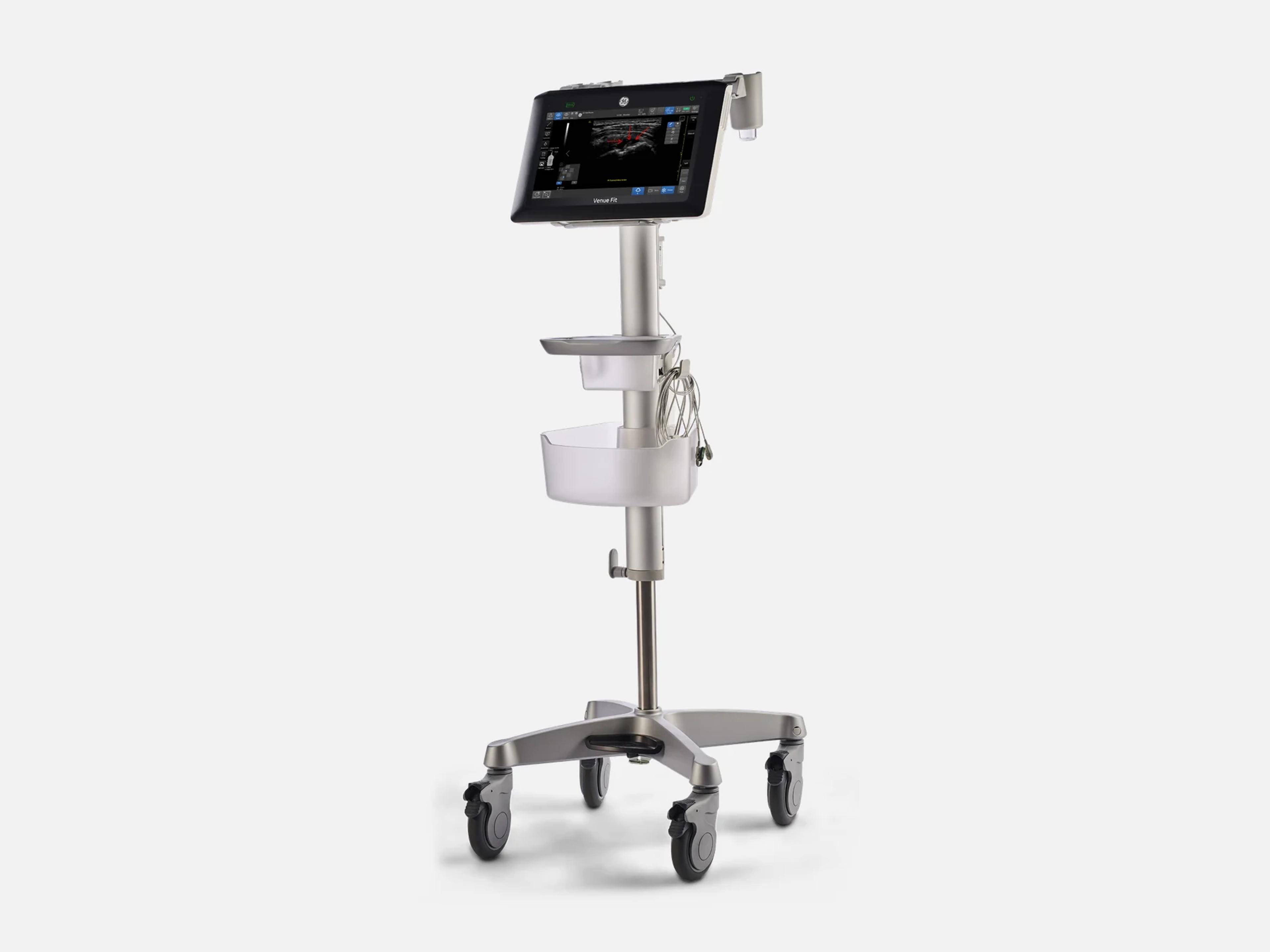
The GE Venue Fit is the Venue family's smallest-footprint point-of-care ultrasound system, with optional AI tools for cardiac imaging and nerve blocks. It weighs 5.5 kg with its battery and rear-support stand, has a 14-inch multi-touch display and mounts on a cart, a kickstand or a VESA bracket. Its siblings are the cart-based Venue with a 19-inch screen, the Venue Go and the entry-level Venue Sprint.
- Released
- 2021launched by GE
- Probe ports
- 2wired, plus wireless probes
- Display
- 14-inch1920 x 1080 multi-touch LCD
- Weight
- 5.5 kg12 lbs, with battery & stand
Compatible probes
Linear
- 9L-RS
- 12L-RS
- L4-12t-RS 4 configurable buttons
- L4-20t-RS XDclear, 4 configurable buttons
- ML6-15-RS
- L8-18i-RS Hockey-stick
- L10-22-RS
Convex & microconvex
- C1-5-RS
- C2-9-RS
- 8C-RS Microconvex
Phased
- 3Sc-RS
- 6S-RS
- 12S-RS
Endocavity
- E8C-RS Intracavitary microconvex
Specialty
- 6Tc-RS Transesophageal
- Vscan Air CL Wireless; R5 or higher, APU back end only
- Vscan Air SL Wireless; R5 or higher, APU back end only
Specifications
Display
- Display
14-inch wide 16:9 multi-touch LCD, 1920 x 1080 pixels; R4: ±80° viewing angle, 60 Hz14-inch wide, 16:9 multi-touch LCD, 1920 x 1080 pixels; touch responds to a bare finger, a latex-gloved hand (also with gel) and a display covered with transparent foil. R4: high-resolution color LCD, ±80° horizontal and vertical viewing angle, 60 Hz frame rate, sealed display.Show allShow less
- Display tilt
- On the cart: forward 10° ± 2°, backward 40° ± 2°; up to 48° on the optional rear stand
Physical
- Weight
- 5.5 kg (12 lbs) with battery and rear-support stand; 5.517 kg without cart and peripherals
- Weight on cart
- About 28 kg (61.6 lbs), cart with mounted system, without probes
- Dimensions (system only)
Height 319 mm with handle, width 399 mm, depth 70 mm (93 mm with handle)Height 319 mm (12.6 in.) including carrying handle; width 399 mm (15.7 in.); depth 70 mm (2.7 in.), 93 mm (3.7 in.) with carrying handle.Show allShow less
- Dimensions (system on cart)
- Height 1212–1570 mm (47.7–61.8 in.), width 474 mm, depth 474 mm (18.7 in.)
- Optional cart
- Height 1063–1413 mm, width 474 mm, depth 474 mm, weight 21.3 kg (47.2 lbs)
- Cart
Foot-pedal up/down (350 mm range) and tilt; four 5-inch locking swivel castersFoot pedal at the base drives the up/down mechanism (350 mm, 13.8 in. range) and tilt; four 5-inch swivel casters, each with brake and swivel lock; VESA mounting with an easy-release bracket; AC/DC power supply compartment; ECG module mounting bracket; cable management; anti-theft slot; large and small removable storage bins; detachable holders and bins.Show allShow less
- Mounting
- Cart, tabletop or boom via VESA 75 x 75 bracket; optional rear kickstand tilts up to 48°
- Probe ports
- Two RS connectors on the rear with locking latches; wireless dual probe connectivity
- Probe holders
Holder for 2 probes, gel and carry handle; interchangeable holdersHolder for 2 probes, gel and carry handle; interchangeable probe holders keep cords off the ground; holder slots help with probe elevation and draping for sterile procedures.Show allShow less
- Controls
Full touch interface with no buttons or knobs; tap, pinch, swipe; works with glovesFull touch user interface with no buttons or knobs; multi-touch with gesture recognition (tap, pinch, swipe, drag-and-drop, double-click); long touch acts as right-click; works with gloves or screen covers; probe and application quick select, home screen, mode-specific controls, alphanumeric touch keyboard; capacitive sealed power button.Show allShow less
- Front-panel indicators
On/off touch button, internal-battery and power-adapter indicators, light sensorsOn/off touch button with green and orange LED indicator, internal-battery indicator, power-adapter indicator and light sensors on the front panel; battery switch.Show allShow less
- Speakers
- Two on the rear, for Doppler audio and system sounds
Power & battery
- Battery
One lithium-ion smart battery pack, standard; built-in charger; power breaker switchOne lithium-ion battery pack in the battery bay as standard: three lithium-ion cells in a plastic enclosure with controller and fuel-gauge electronics (smart battery pack); built-in charger; battery power breaker switch for transportation.Show allShow less
- Battery scan time
Up to one hour of continuous scanning on one battery packUp to one hour of continuous scanning on one battery pack; at least 60 minutes of continuous 2D scanning with the 3Sc-RS probe and the Cardiac factory preset on a new, fully charged battery.Show allShow less
- Battery recharge time
- Less than 2 hours in Freeze mode (R4)
- Power supply
100–240 V AC, 50/60 Hz, through an external 24 V AC/DC adapterExternal AC/DC 24 V adapter, 100–240 V AC, 50–60 Hz; up to 1.04 A at 240 V AC and up to 2.5 A at 100 V AC. Site-preparation table: 90–240 V AC ±10%, 2.5 A RMS at 115 V AC, 47–63 Hz.Show allShow less
- Power consumption
250 W system only; 350 W with cart and peripherals250 W system only; 350 W with cart and peripherals. Without peripherals: max. 125 VA without charging, max. 230 VA while charging. R4: max. 150 VA.Show allShow less
- Start-up time
About one minute (R5/R6); R4: boot under 57 s, from sleep under 7 sR5/R6: approximately one minute. R4: system boot from full shutdown under 57 s; sleep/standby fast boot under 7 s (average); probe loading under 3 s.Show allShow less
Connectivity & options
- Connectivity
1000 Base-TX Ethernet, HDMI 1.4a, 4 USB 3.0 (3 rear, 1 side); optional wireless LANEthernet 1000 Base-TX (IEEE 802.3) on the rear panel (R4: 10/100/1000 Base T); HDMI 1.4a at 1920 x 1080; USB 3.0: three on the rear panel, one on the side; optional IEEE 802.11ac/a/b/g/n wireless LAN with Bluetooth 4.0 on a rear USB port, 2.4–2.4835 GHz and 5.15–5.85 GHz, country dependent.Show allShow less
- DICOM
DICOM 3.0: Storage (up to two servers), Worklist, Query/Retrieve, Structured ReportingDICOM 3.0: Storage to up to two servers, with Direct Store sending an image right after acquisition; Worklist; Query/Retrieve; Structured Reporting (Echo TID 5200, Vascular TID 5100); multi-frame DICOM; network store to a shared folder; TLS for Modality Worklist, PACS storage and Query/Retrieve.Show allShow less
- DICOM Web and patient QR code
- Only with the Caption Guidance option key; generic DICOM Web is not supported
- Archiving formats
- JPEG, MPEG4/H.264, AVI, DICOM, Raw Data + DICOM, WMV (R4)
- Security
Disk encryption, DICOM TLS, whitelisting, LDAP, optional RFID login, audit trailFull disk encryption (BitLocker) for patient data: on by default for every partition on APU systems, off by default on CPU systems, where it can be enabled for the patient-data drive; a password or recovery key is needed to read encrypted patient data. Encryption for external media; DICOM TLS (TLS 1.2); whitelisting; LDAP user credentials; account policies; optional RFID badge login; security audit trail.Show allShow less
- Peripherals
Wireless B/W printer, barcode reader, CD/DVD drive (R4.1 on), USB ECG, RFID readerBlack-and-white printer connected wirelessly through a dedicated adapter; barcode reader for patient-ID and needle-type barcodes and user QR codes (a USB barcode reader is supported from R4.1 software); CD/DVD drive from R4.1 software; Wi-Fi adapter; USB ECG with 3 electrodes, type CF defibrillator-proof; HAM box for wireless probe communication; optional RFID reader.Show allShow less
- Reporting
ViewPoint bedside reporting (optional, from R4.1, region dependent); Qview web reportingViewPoint: on-system bedside reporting on predefined forms, an optional exam report package supported from R4.1 software, region dependent, needing a continuous connection to a ViewPoint 6 workstation. Qview: web access to the Qpath bedside exam reporting product, licensed and not available in all countries.Show allShow less
- Remote service
- RSVP client pre-installed for GE service and applications support; InSite remote console
- Usage and service reporting
Imaging Insights usage reports in DICOM format; My GE HealthCare service reportingImaging Insights server support for analysis of system usage, reported in DICOM format; My GE HealthCare reporting of equipment maintenance, service agreement and entitlement information.Show allShow less
Imaging & software
- Revision and software
- R3, R4 (R4.1 software), R5 (R5.1 software), R6
- Catalog numbers
R3: H45303VFSC, H45303VFSW; R4: H45314VFSC; R5: H45335VFS; R6: H45346VFSR3: H45303VFSC, H45303VFSW; R4: H45314VFSC; R5: H45335VFS (Wuxi: H45335VFSW); R6: H45346VFS (Wuxi: H45346VFSW).Show allShow less
- Operating system
Windows 10 Embedded on a Ryzen APU back end; CPU back ends also existWindows 10 Embedded on a Ryzen APU back end (R4: Ryzen V1000 series APU with Vega Radeon graphics, 1807B APU); CPU back ends also exist.Show allShow less
- Processing channels
128 TRX channels; cSound software beamforming128 TRX channels on the Compact Front End Board, with cSound software beamforming for 128 channels; probes with up to 128 elements connect directly and 192-element probes through on-board HV multiplexers.Show allShow less
- Storage
Internal SSD, four logical drives; R4: 128 GB, archive over 60 GB; R5/R6 spare: 512 GBInternal SSD partitioned into four logical drives, from which the configuration and software load at power-up. R4: single integrated 128 GB solid state drive, archive over 60 GB as standard. R5/R6 spare part: 512 GB M.2 SSD.Show allShow less
- Imaging modes
B, CHI, M, Anatomical M, CFM, M-Color Flow, PDI, PDI+, CW, PW with high PRF, TDIB-Mode; Coded Harmonic Imaging (CHI); M-Mode; Anatomical M-Mode; Color Flow Mode (CFM); M-Color Flow Mode; Power Doppler Imaging (PDI) and PDI+; Continuous Wave Doppler (CWD); Pulse Wave Doppler (PWD) with high PRF; Tissue Doppler Imaging (TDI). Available modes depend on installed software.Show allShow less
- Simultaneous modes
Duplex or triplex, probe dependent: B/PW, B/CW, B/CFM, B/PDI, B/M, B/CFM/PW, B/CFM/CWDuplex or triplex, probe dependent: B/PW, B/CW, B/TDI, B/CFM, B/PDI, B/PDI+, B/M, B/AMM, Dual B + CFM, Dual B + PDI, Needle Recognition + CFM or PDI, B/CFM/PW, B/CFM/CW; selectable alternating modes, probe dependent.Show allShow less
- Image processing
CrossXBeam compounding (3 angles), SRI-HD, Automatic Optimization, Raw Data ProcessingCrossXBeam™ spatial compounding with 3 angles, compatible with Color Mode; High Definition Speckle Reduction Imaging (SRI-HD) with multiple levels; Automatic Optimization (Continuous Tissue Optimization, Auto Spectrum Optimization); Raw Data Processing.Show allShow less
- Field of view
- Virtual Convex on all linear probes; Virtual Apex on some presets on sector probes
- VenueView Panoramic View
- B-mode extended field of view up to 60 cm on all linear probes; auto direction detection
- Imaging depth
- Maximum 0–36 cm, minimum 0–1.0 cm, probe dependent
- B-mode image refresh rate
- 980 images/sec, standard on R4
- Dynamic range
- B-mode 36–102 dB (application dependent); M-mode 36–96 dB
- Doppler velocity range
- PW 3 to 870 cm/s (140 to 19,800 Hz); CW 5 to 1,310 cm/s (260 to 40,000 Hz)
- Cine memory
- Up to 180 sec or 100 heart cycles; retrospective or prospective storage
- Image review
- Split screen, zoom, cine playback; multi-image split screen with ECG-synchronized cine
- Needle Recognition
- Needle display even in Color and Power Doppler; on all linear and some convex probes
- cNeedle
- On the C2-9-RS probe (2025 FDA submission)
- Caption Guidance
AI turn-by-turn guidance for capturing cardiac images; needs its option keyAI-driven, turn-by-turn on-screen guidance for capturing cardiac images, enabled by the Caption Guidance option key; the 2025 clearance extends its application to the Vscan Air SL.Show allShow less
- cNerve (optional)
- AI tool highlighting nerve landmarks for nerve blocks; adults; available in some regions
- Nerveblox™
- AI tool labeling key anatomical landmarks for ultrasound-guided peripheral nerve block
- Shock Toolkit (optional)
Auto VTI (VTI, cardiac output), Auto IVC (collapsibility), Auto B-Lines (lung score)Optional package of automated heart, lung and inferior vena cava assessments: Auto VTI calculates and shows VTI and cardiac output (CO) trends in one step; Auto IVC measures IVC collapsibility or distensibility; Auto B-Lines calculates an overall lung score in one step (pediatric use excludes neonates).Show allShow less
- Real Time EF
- Ejection fraction, cleared for pediatric use excluding neonates
- Auto Bladder Volume
- AI bladder volume measurement from transverse and longitudinal views
- Auto Volume Flow
- Real-time brachial or radial artery flow volume, for dialysis preparation
- Gastric Measurement
- Gastric cross-sectional area, volume and volume-to-weight ratio
- Catheter Vessel Ratio
- Supports choosing catheter size from vessel diameter
- Documentation diagrams
Lung, eFAST, Renal, Elbow and Shoulder (optional MSK Toolkit); one-tap image allocationReal-Time Documentation diagrams for scanning, one-tap allocation and quick review of images and findings by zone, organ or state: Lung (anatomical segments, 1-click image storing), eFAST (internal bleeding to pneumothorax), Renal (hydronephrosis), Elbow, and Shoulder in the optional MSK Toolkit. The K234106 submission adds knee, wrist/hand, hip, elbow and ankle/foot areas.Show allShow less
- Reference Image and Bilateral
- Reference Image (anatomy markups, probe position); Bilateral view with synced settings
- Venue Coach MSK
- Reference images guiding novice users to the correct anatomy, with documentation
- Venue MSK Coach
- Reference images and markups: shoulder, knee, hip, elbow, wrist/hand, ankle/foot
- Patient Follow-up Tool
- Recalls prior-exam settings and compares side by side in live B, Color and PDI
- Simple Screen Mode
- One tap enlarges the image by 18% and shows fewer controls
- Scribble
- Touch pointer and free drawing for training, also on an external or shared screen
- Calculation packages
Cardiac, OB with tables, multi-gestational, fetal growth, MSK, gynecological, urologicalMeasurement & Annotation Package; editable calculations; Cardiac Calcs; OB Calcs and Tables; Multi Gestational Calcs; fetal growth trending; Musculoskeletal Calcs; Gynecological Calcs; Urological Calcs; real-time automatic Doppler calculations with Auto Doppler Trace.Show allShow less
- Presets
- User-defined, anatomy-specific, user-programmable and factory default presets
- Contrast (CEUS)
- Contrast-enhanced ultrasound, enabled only in authorized countries or regions
- Probe Check
- Automated pass/fail probe element check, at first connection or from the probe selector
- Probe Assessment Tool (cPAT)
Finds defective probe elements or Tx/Rx channels; needs an SSA service dongleService diagnostic that transmits and receives through each probe element to find defective probe elements or Tx/Rx channels; activation needs an SSA service dongle, and customers can buy class C access.Show allShow less
- Software option keys
- One alphanumeric key enables an option or a set of options; keys are unit-specific
- eDelivery
- Software update notification; installation suspends disk encryption while it runs
- On-board User Manual
- On-board manual and electronic documentation (eIFU) over the internet
- Other named tools
Lung Application, Educational Exam, Bladder Volume Tool, Venue Coach, AppAPI…Lung Application; Educational Exam; Bladder Volume Tool; Catheter to Vessel Ratio (supports choosing catheter size from vessel diameter); Venue Coach; AppAPI functionality; Maximize image, for shallow-depth scanning.Show allShow less
Environment
- Operating environment
- +10 to +40 °C (50–104 °F), 30–85% humidity non-condensing, 700–1060 hPa, up to 3000 m
- Cooling requirement
- 450 BTU/hr for the unit environment; up to 600 BTU/h with on-board peripherals
- Acoustic noise
- Less than 55 dB(A) at 20 °C, at the operator's head position
Compliance
- FDA 510(k)
K251322 (2025-07-25), K234106 (2024-06-10), K220848 (2022-06-27), K203137 (2020-12-29)K251322 (R6, decided 2025-07-25); K234106 (R5, 2024-06-10); K220848 (R4, 2022-06-27); K203137 (R3, 2020-12-29). FDA product code IYN (System, Imaging, Pulsed Doppler, Ultrasonic).Show allShow less
- Safety conformance
R4: ANSI/AAMI ES60601-1, CAN/CSA-C22.2 No. 60601.1, ISO 10993-1, NEMA UD3R4: ANSI/AAMI ES60601-1 and CAN/CSA-C22.2 No. 60601.1 by Nationally Recognized Testing Laboratories; ISO 10993-1 biological evaluation (probes); NEMA UD3 acoustic output display (MI, TIS, TIB, TIC).Show allShow less
Languages
- User interface languages
Brazilian Portuguese, Chinese, Danish, Dutch, English, Finnish, French, German, Italian…Brazilian Portuguese, Chinese, Danish, Dutch, English, Finnish, French, German, Italian, Japanese, Norwegian, Portuguese, Russian, Spanish and Swedish (R4).Show allShow less
What to check when buying a used GE Venue Fit
Confirm the battery recall correction was done
On R3, R4 and R5 units, FDA recall Z-1556-2025 covers a battery that can fail internally and give off smoke or fire, and an FDA adverse-event report describes a Venue Fit battery that ignited while plugged in.
How: With the system off and unplugged, remove the battery, read the date-of-manufacture label on its underside and confirm GE's correction under this recall has been carried out on the unit.
Reject a damaged, leaking or deformed battery
A battery in the Bad state disables charging and leaves the system running on AC power only.
How: Look for damage, leaks, odor, deformation or discoloration, then tap the on-screen battery icon and read whether it reports Degraded or Bad.
Inspect the power cord, inlet and rear connectors
A cord with cuts or exposed insulation should not be used, and the rear panel carries the HDMI, network and USB connections.
How: Look for cuts, tire marks, exposed insulation or deterioration along the cord, bent pins and loose or missing hardware on the rear connectors, and confirm the inlet retainer holds the plug.
Reject probes with cracked lenses or housings
A cracked or damaged probe, or one showing any evidence of wear, must not be used.
How: Inspect each probe's lens, housing, cable and strain relief at both ends for cracks, holes or wear, and run a leakage test on every probe.
Common questions about the GE Venue Fit
Is the GE Venue Fit FDA-cleared?
Yes. The Venue Fit is FDA-cleared under 510(k): K203137, decided December 29, 2020, for R3; K220848, June 27, 2022, for R4; K234106, June 10, 2024, for R5; and K251322, July 25, 2025, for R6. Its FDA product code is IYN.
Has the GE Venue Fit been recalled?
Yes. FDA recall Z-1556-2025, started on March 6, 2025, covers Venue Fit R3, R4 and R5 systems because the battery can develop an internal failure that could result in smoke or fire. The system is fully functional on AC power without the battery, and GE committed to correct every affected unit.
Does the GE Venue Fit work with wireless probes?
Yes, with conditions. Besides its 2 wired probe ports, the Venue Fit supports the Vscan Air CL and Vscan Air SL wireless probes, bought from GE HealthCare with a license key.
They need R5 software or higher and an APU back end, and they will not work on a CPU back end. On the Venue Fit they connect through the HAM box, and first-time registration needs an internet connection.
How is the GE Venue Fit different from the Venue and Venue Go?
The Venue Fit has the smallest footprint in the Venue family, with detachable holders and bins, and it can sit on a cart, a kickstand or a VESA mount. The Venue is the cart-based system with a 19-inch screen and batteries of up to four hours, and the Venue Go goes from cart to table to wall.
The Venue Sprint is the entry-level all-in-one, pairing wireless connectivity with a small console. All four share one platform and interface.