Siemens ACUSON Sequoia
Siemens Healthineers · ACUSON series
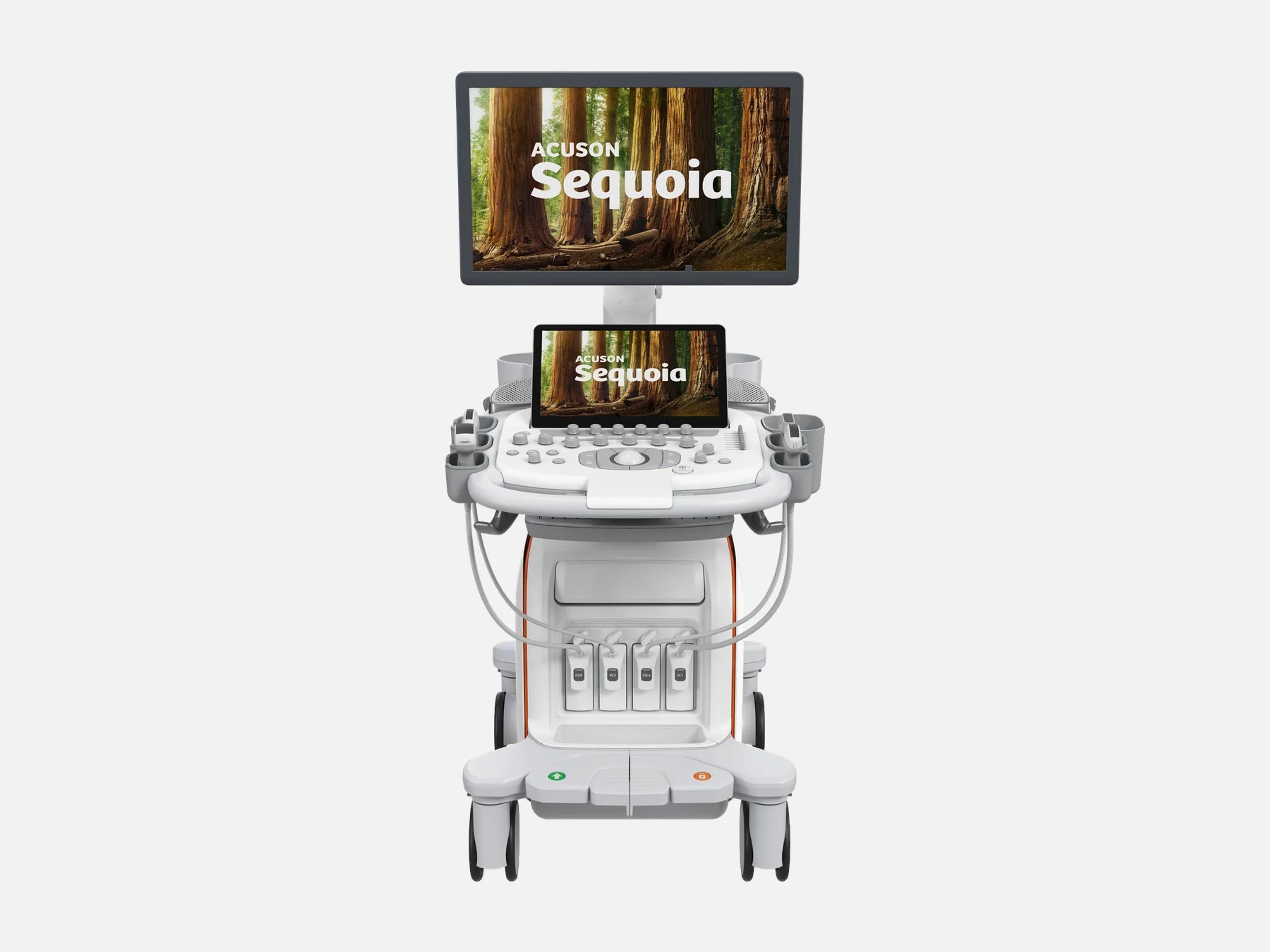
The Siemens ACUSON Sequoia is an ultra-premium ultrasound system for radiology, OB/GYN and shared-service cardiology, announced in 2018. It weighs 125 kg (276 lb) and has four array transducer ports plus an auxiliary CW port. It sits beside ACUSON Redwood, ACUSON Juniper and ACUSON Maple in the general imaging range; ACUSON Sequoia Select is a separate system sharing its manuals and 510(k)s.
- Released
- 2018launched by Siemens
- Probe ports
- 4plus one auxiliary CW port
- Display
- 23.8-inchor 21.5–22-inch OLED
- Weight
- 125 kg276 lb, ready for use
Compatible probes
Linear
- 7L2 · 1.7–8 MHz
- 10L4 · 2.9–9.9 MHz
- 14L5 · 4.8–13.6 MHz
- 15L4 · 3.5–15.1 MHz
- 18L6 · 4.4–18.2 MHz
- 18H6 · 5.5–21.1 MHz
- HLX High-frequency linear
Convex & microconvex
- 5C1 · 1–5.7 MHz
- 7VC2 · 1.8–6.9 MHz Volume imaging
- 9C2 · 1.4–8.5 MHz Single crystal
- 9C3 · 2.2–9.2 MHz
- 11M2 · 2–10 MHz Microconvex, single crystal
- 11M3 · 2.7–10.7 MHz Microconvex
- DAX · 1–3.5 MHz Deep Abdominal Transducer
Phased
- 4V1 · 1.4–4.9 MHz
- 5V1 · 1.1–4.9 MHz
- 5Z1 · 0.9–3.8 MHz Matrix array, volume imaging
- 8V3 · 2.1–8.3 MHz
- 10V4 · 3.4–10.4 MHz
Endocavity
- 9EC4 · 2.9–8.1 MHz Transrectal
- 9VE4 · 3.2–9.9 MHz Transvaginal, volume
- 10EV3 · 2.7–9.9 MHz Transvaginal
Specialty
- Z6T Transesophageal, 4D
- CW2 CW pencil, auxiliary port
- CW5 CW pencil, auxiliary port
Specifications
Display
- Main monitor
23.8-inch dual-layer WLED with luminance sensor, or 21.5–22-inch OLED; both 1920x1080Two configurations: a 23.8-inch diagonal dual-layer WLED monitor with a luminance sensor, built-in GSDF and QAWeb support; or a 21.5- to 22-inch diagonal OLED monitor without a luminance sensor, with two USB ports. Both full HD 1920x1080, 16:9.Show allShow less
- Touch screen
13.3-inch (orange-backlit panel) or 15.6-inch (blue-backlit panel); full HD, glove useSize depends on the control-panel version: 33.782 cm (13.3-inch) diagonal widescreen tilting 30° to 60° with the orange-backlit panel, or 39.624 cm (15.6-inch) tilting 30° to 50° with the blue-backlit panel. Both full HD and usable with gloved hands.Show allShow less
- Monitor articulation
Height 139–173 cm; tilt +90° forward, -15° back; swivel ±45°; folds down for transportMonitor height 139 cm to 173 cm; tilt +90° forward and -15° backward; swivel ±45°; lateral adjustment ±360° around the system on adjustable arms; folds down for transport, with locks on the arms.Show allShow less
Physical
- Weight
125 kg (276 lb), not to exceed 155 kg (341 lb), ready for use125 kg (276 lb), not to exceed 155 kg (341 lb): the system unpacked and ready for use, including installed documentation devices such as printers.Show allShow less
- Dimensions
- Width 60 cm; height 120–175 cm; depth 94–108 cm (108 cm minimum for storage)
- Transducer ports
- Four array transducer ports plus one auxiliary CW port; compact pinless connectors
- Control panel
Backlit, ambidextrous; swivels ±90°; height 76–99 cm or 74–97 cm by panel versionBacklit control panel with an ambidextrous layout for standing or sitting: left/right swivel ±90°; height 76 cm to 99 cm (orange-backlit panel) or 74 cm to 97 cm (blue-backlit panel). Touch screen with gesture transducer selection; gesture-detecting transducers start scanning with a tap on the handle.Show allShow less
- Mobility
Four locking swivel wheels, steering and rear handles, tilt-down monitor with locking armSteering handle; rear handle for repositioning; four locking swivel wheels, the front pair locking together (locked, swivel-locked or unlocked) and the rear wheels individually; tilt-down monitor with locking arm; locking control panel.Show allShow less
Power & battery
- Power requirements
- 100 V~ to 240 V~; 5.4 to 13.0 A; 50 to 60 Hz
- Start-up from Hibernate
- Ready in approximately 30 seconds (VA25 software)
Connectivity & options
- Connectivity
DICOM 3.0; RJ-45 Ethernet 10/100/1000BaseT; DisplayPort output; USB on panel and monitorDICOM 3.0. RJ-45 Ethernet 10BaseT/100BaseT/1000BaseT on the rear panel. DisplayPort output for an external monitor. USB ports: 4 on the input/output panel, 2 left of the touch screen, 2 on the right of the monitor (monitors without a luminance sensor only). Clips export as DICOM, or as AVI with JPEG lossy compression.Show allShow less
- DICOM services (VD10)
Image and multiframe storage, worklist, storage commitment, structured reports, MPPSSoftware VD10 supports ultrasound image storage, multiframe image storage, modality worklist, storage commitment, comprehensive structured reports and MPPS.Show allShow less
- Wireless
Optional 802.11a/b/g/n/ac on 2.4 and 5 GHz; WPA/WPA2, PSK or Open; TKIP or AESOptional wireless network connection: 802.11a/b/g/n/ac on 2.4 GHz and 5 GHz; WPA, WPA2, WPA PSK, WPA2 PSK or Open authentication; TKIP or AES encryption; EAP PEAPv0 and TLS.Show allShow less
- Virtual Workstation
Browse-and-review archive and PACS access by web browser or remote desktop; one-wayRemote access to the facility's archive and information system from the ultrasound system, through a web browser or remote desktop session. One-way data transmission; PACS access is browse-and-review only.Show allShow less
- Data storage encryption
- Encrypts stored patient data and system settings; recovery needs a USB recovery key
- Printer and media options
UP-D711MD or UP-D898DC B/W printer; off-board UP-X898MD, UP-D25MD color; DVD/CD drivePrinter assembly options: UP-D711MD or UP-D898DC black-and-white. Off-board printers: UP-X898MD black-and-white and UP-D25MD color. DVD/CD optical drive option (DVD-R, CD-R).Show allShow less
- Accessory options
Retractable Keyboard, Footswitch, Smart Card Reader, Gel Warmer, Physio Module (ECG)…Retractable Keyboard; Footswitch (configurable three-pedal, USB); Smart Card Reader; Protective Overlay; Rear Accessory Tray; Gel Warmer; Large Gel Holder; leakage tester for TEE transducers; Universal Video Converter; Physio Module (ECG); Remote Services.Show allShow less
- Option licensing
Options depend on the licenses bought; available at purchase or as upgradesAvailable options depend on the licenses purchased for the system; optional features can be bought at purchase or as upgrades. Before software VA50, a feature may need an upgrade purchase.Show allShow less
- Remote service
- Kinectus Remote Service: cloud-based remote support and remote software updates
- Remote service (VA25 software)
- Smart Remote Service for remote software upgrades; eSieLink remote assistance
- Online services
- teamplay Fleet portal for service, cybersecurity and fleet evolution; PEPconnect
- TechUp 18
- Anti-obsolescence program: software upgrades at least once every 18 months
Imaging & software
- Revision and software
Product Version 4.0, software VD10 (2026-04); earlier releases from 1.1 / VA20Product Version 4.0, Software Version VD10 (first issued 2026-04; covered by K260844). Earlier product / software versions: 1.1 / VA20 (2020-04), 1.3 / VA30 (2021-07), 2.0 / VA40 (2022-07), 2.5 / VA50 (2023-05), 3.0 / VB10 (2023-10), 3.5 / VB30 (2024-11), 3.9 / VC10 (2025-07). Other named levels: VA11A (K193257) and VA25.Show allShow less
- Operating system
- Windows-based (Windows 10 at version 3.9); self-installable online updates
- Imaging modes
2D, Color, Power, PW, HPRF and CW Doppler, M-mode, strain and shear wave, 3D/4D2D-mode (including Harmonics Imaging and Harmonics Imaging for Contrast Agent Imaging); color flow Doppler (Color velocity, Power energy); Pulsed Wave, Pulsed Wave Doppler Tissue Imaging, High PRF Pulsed Wave, Steerable CW (imaging transducers) and CW (non-imaging transducers) Doppler; M-mode with Harmonics and Anatomical M-mode; Strain Imaging and Shear Wave Elastography; 3D/4D Volume Imaging. Combined: 2D with Color, Doppler, M-mode and Elastography; 3D/4D with Color.Show allShow less
- 2D frame rate
- Up to 250 fps by transducer and depth; up to 5,952 fps with HLX (Vascular Access)
- Display depth
- 0.5 cm to 55 cm, transducer dependent; 55 cm with the DAX
- Standard imaging features
InFocus, Clarify, TEQ, UltraArt Universal Image Processing, Speed of SoundInFocus dynamic transmit focusing on all imaging transducers, with no conventional focal zones; Clarify Technology, which reduces 2D artifacts and uses flow information to clear noise and reverberation from vessels; TEQ tissue equalization with Auto Tissue Equalization Optimization; UltraArt Universal Image Processing for speckle reduction and contrast; Speed of Sound adjustment by preset.Show allShow less
- Automation
1-click registration, AutoFlash color suppression, Auto Calcs Software, Auto IMT1-click registration (machine learning selects the transducer and exam type); AutoFlash color suppression technology; Auto Calcs Software (area, volume and maximum diameter by border detection on a user-defined ROI); Auto IMT (posterior carotid intima-media thickness).Show allShow less
- Flow imaging
Slow Flow color Doppler; Advanced Power and Dynamic MultiHertz optionsSlow Flow color Doppler, with smart filters and adaptive signal enhancement for small, low-flow vessels; Advanced Power option, adding a slow power flow state in Color Doppler mode; Dynamic MultiHertz option, with Color AutoHz imaging.Show allShow less
- Elastography options
Virtual Touch Strain, Point Shear Wave, Auto pSWE, Shear Wave Elastography and UDFFVirtual Touch Strain Imaging (9EC4; 10L4, 14L5, 15L4, 18L6, HLX); Virtual Touch Point Shear Wave Elastography (4V1, 5C1, 9C2, DAX, 10L4); Virtual Touch Auto pSWE, up to 15 measurements per label (9C2, DAX); Virtual Touch Shear Wave Elastography (5C1, 9C2, DAX, 10L4, HLX, 15L4, 18L6); Virtual Touch UDFF, with an estimated attenuation coefficient at 3 MHz, license dependent (5C1, 9C2, DAX).Show allShow less
- Cardiac options
Cardiac Imaging, Cardiac Volume Imaging, Stress Echo, 2D/4D Heart AI, Trace AI…Cardiac Imaging (needs the physio module). With it: Cardiac Volume Imaging with Biplane Imaging (5Z1, Z6T); Stress Echo (5V1, 5Z1, 8V3, 10V4, CW2); 2D Heart AI and 2D Heart+ AI (5V1, 5Z1, 8V3, 10V4); 4D Heart AI (5Z1, Z6T); AI Assist for color ROI and Doppler gate placement in TTE (5V1, 5Z1, 8V3); Trace AI, which needs Cardiac Volume Imaging (5Z1, Z6T).Show allShow less
- AI and measurement options
AI Abdomen, AI Measure, Auto OB Measurements, Auto Doppler and Auto SpectralAI Abdomen (labels 17 abdominal views and 12 routine measurements); AI Measure (calipers on recognized anatomy; up to 120 AI-powered calculations); Auto OB Measurements (CRL, BPD, HC, AC, FL, humerus length, OFD); Auto Doppler (7L2, 10L4 on Arterial and Carotid presets) and Auto Spectral, which sets gain, baseline, scale and wall filter.Show allShow less
- Volume and panoramic options
Freehand 3D, Advanced Volume Rendering, 3D Surface Rendering, Panoramic, Wide FOVFreehand 3D Volume Imaging with standard transducers (rocked: 5C1, 9C2, 11M2, 11M3, 9EC4, 10EV3; linear: 10L4, 15L4, 18L6, HLX, 18H6); Advanced Volume Rendering (LightSource, Multislice, FlexPlane); 3D Surface Rendering; Panoramic Imaging up to 60 cm long, with Color Panoramic; Wide FOV (DAX and 5C1 70° to 100°, 11M2 100° to 130°, 2D-mode only).Show allShow less
- Contrast, fusion and needle options
Contrast Agent Imaging, Fusion Imaging with CT or MRI, Needle EnhancementContrast Agent Imaging: real-time low-MI contrast with Burst/Flash and Flash Sequencing, and VueBox support; in the USA the 14L5, 15L4, 18L6, 9EC4, 9VE4 and 10EV3 are not compatible with contrast. Fusion Imaging aligns CT or MRI data with live ultrasound (4V1, 5C1, DAX, 10L4) using electromagnetic tracking. Needle Enhancement (7L2, 10L4, 15L4, 18L6, HLX).Show allShow less
- Other imaging features
Bi-Plane+ (with the Z6T), Trapezoidal Imaging on linear transducers, Modality CompareBi-Plane+ color Doppler imaging with the Z6T transesophageal transducer; Trapezoidal Imaging on all linear transducers; Modality Compare, which shows a prior mammography, CT, MRI or ultrasound exam beside the live one.Show allShow less
- Standard or optional features
Directional Power, Dual SWE Maps, Gesture Detection, Image Rotate, Protocol WorkflowDirectional Power, Dual SWE Maps, Gesture Detection for Transducers, Image Rotate and Protocol Workflow, each either standard or optional on the ACUSON Sequoia at Product Version 4.0.Show allShow less
- VA25 software options
eSie OB Measurements, eSieCalcs Software, syngo Velocity Vector ImagingNamed for software VA25: eSie OB Measurements; eSieCalcs Software (area, volume, diameter and length by border detection); syngo Velocity Vector Imaging (tissue velocity and deformation, including LV rotation and strain). K260844 (VD10) removed the legacy syngo framework.Show allShow less
- Features named in 2020–2021 filings
Custom Tissue Imaging, eSieDoppler, Image Rotate (2021); eSie Calc, eSie OB (2020)Named in the 2021 filing: Custom Tissue Imaging, eSieDoppler and Image Rotate. Named in the 2020 filing: eSie Calc, eSie OB, Flash Sequencing, Motion Stabilized Persistence, Dynamic MultiHertz, Color Panoramic imaging, Virtual Touch pSWE and syngo Velocity Vector Imaging.Show allShow less
Environment
- Operating environment
- +10 to +40 °C (+10 to +35 °C with a printer); 20–80% RH, non-condensing; 700–1060 hPa
- Storage and transport humidity
- 10–95%, non-condensing
- Cooling
- Air cooling
- Noise level
- 35 to 38 dB (VA25 software)
Compliance
- FDA 510(k)
K260844 (2026-06-16), K251481 (2025-08-20), K242523 (2024-11-19) … K193257 (2020-01-31)K260844 (2026-06-16); K251481 (2025-08-20); K242523 (2024-11-19); K240704 (2024-07-22); K232145 (2023-10-30); K223735 (2023-02-06); K221500 (2022-06-14); K211859 (2021-07-20); K202683 (2020-10-15, shared with other ACUSON systems); K201462 (2020-06-24); K200707 (2020-04-15); K193257 (2020-01-31). From K223735 on, the same 510(k)s also cover ACUSON Sequoia Select, and later ones ACUSON Origin and Origin ICE.Show allShow less
Languages
- Control panel text
- English, German, French, Spanish or Italian
What to check when buying a used Siemens ACUSON Sequoia
Inspect the power cord and ECG cable
A frayed, split or worn power cord means the system must not be powered on.
How: Run a hand along the whole cord for fraying, splits or wear, and check the ECG connector and cable for damage.
Inspect every transducer's housing, lens and cable
A transducer with a cracked, punctured or discolored housing, or a frayed cable, must not be used.
How: Look over each housing, acoustic lens, strain relief and cable for cracks or damage; discoloration from the listed cleaners and disinfectants is the one exception.
Confirm the EDD fix from recall Z-1330-2021
Units covered by this recall averaged MSD and GSD into the estimated delivery date calculation until a software update corrected it.
How: Record the installed product and software version, and confirm the correction for this recall is on the unit.
Check any 9VE4 against recall Z-1010-2022
Affected 9VE4 transducers may exceed recommended thermal index limits, and users were told to stop using them.
How: If a 9VE4 comes with the system, compare it with the recall's list of affected transducers and do not accept an affected one.
Common questions about the Siemens ACUSON Sequoia
Is the Siemens ACUSON Sequoia FDA-cleared?
Yes. The ACUSON Sequoia is FDA-cleared under 510(k). Its clearances run from K193257, decided January 31, 2020 with software VA11A, to K260844, decided June 16, 2026, which covers software VD10.
From K223735 onward the same 510(k)s also cover the ACUSON Sequoia Select, and later ones also cover the ACUSON Origin and Origin ICE.
Is the ACUSON Sequoia the same machine as the older Sequoia 512?
No. An earlier Sequoia line, including the ACUSON Sequoia 512 and the Sequoia C512/512SS, predates the 2018 platform and is a different machine; a SEQUOIA PLUS system was cleared under K072365 on October 17, 2007.
The ACUSON Sequoia announced in 2018 was an entirely new platform, and the Sequoia 256 and 512 are legacy systems.
What is the difference between the ACUSON Sequoia and the ACUSON Sequoia Select?
The ACUSON Sequoia Select is a separate system that shares the Sequoia's manuals and 510(k)s. Its transducer list lacks the 9C3 curved array and the 5Z1 matrix array.
Siemens Healthineers introduced the Select Edition at ECR 2023.
Can every ACUSON Sequoia transducer be used for contrast imaging in the US?
No. Contrast Agent Imaging is an option, and in the USA the 14L5, 15L4, 18L6, 9EC4, 9VE4 and 10EV3 are not compatible with it.
Can the ACUSON Sequoia measure liver fat?
Yes, with the Virtual Touch UDFF option. It calculates the ultrasound-derived fat fraction index for steatotic liver disease assessment, with an estimated attenuation coefficient at 3 MHz where licensed, on the 5C1, 9C2 and DAX transducers.
The UDFF tool is indicated as an aid for adult and pediatric patients with hepatic steatosis.
Where does the ACUSON Sequoia sit in the Siemens Healthineers ultrasound range?
It sits under General Imaging with the ACUSON Redwood, the ACUSON Juniper, which can scan on battery, and the ACUSON Maple. In that portfolio the Sequoia is the flagship and the Juniper the high-performance system.
The ACUSON Origin sits under Cardiovascular and is aimed at minimally invasive cardiac procedures; the Sequoia and Origin share recent 510(k)s and the TechUp 18 program.