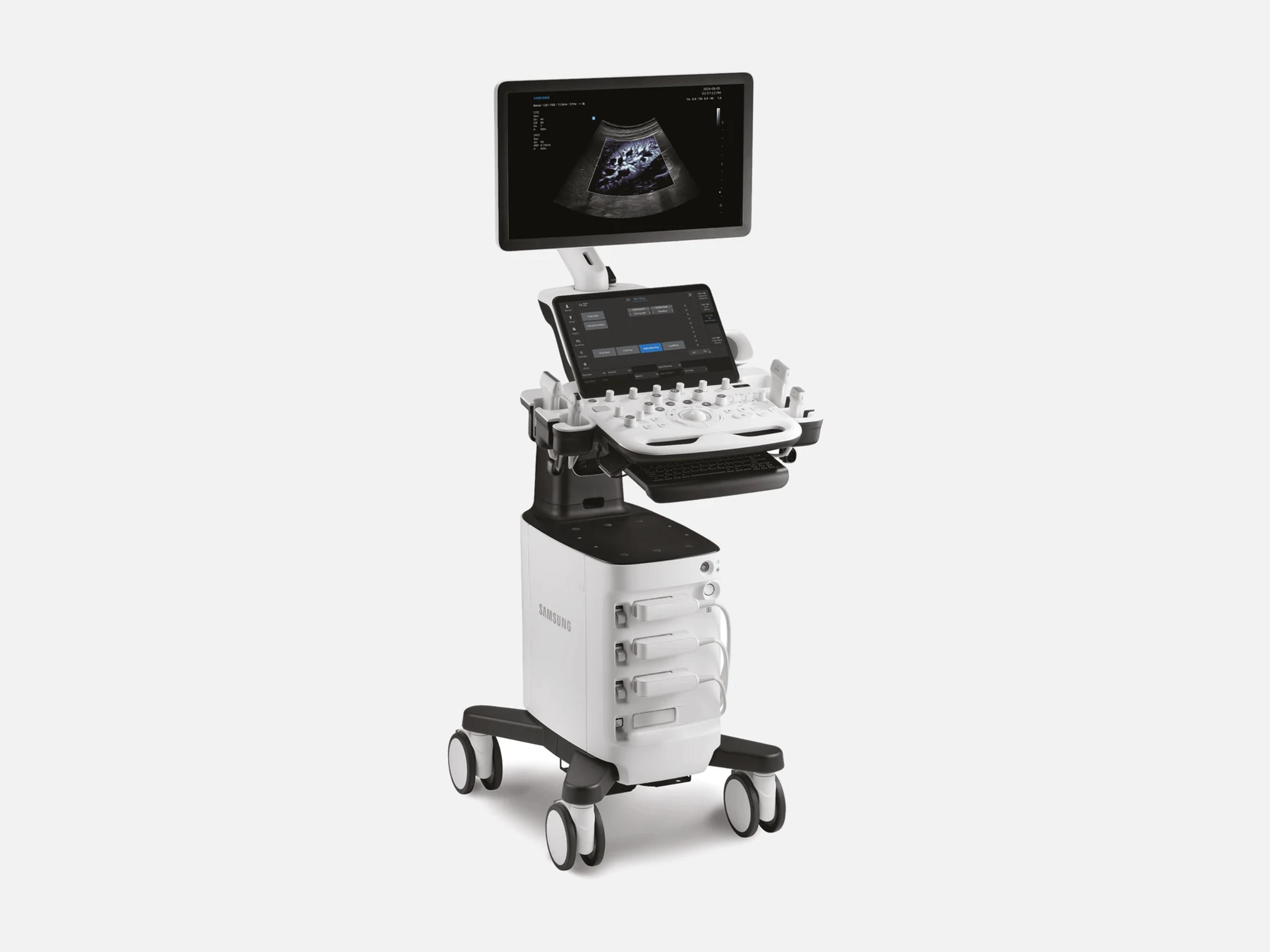
The Samsung V5 is a mid-range V Series ultrasound system built for general imaging, cardiovascular and musculoskeletal diagnostics, with AI features and support for interventional procedures. Samsung also markets it for women's health and point of care. It shares its core technology with the V8, V7 and V6, takes their BiometryAssist, HeartAssist, ViewAssist and NerveTrack unchanged, and was cleared with the V4.
- Released
- 2024first FDA clearance
- Probe ports
- 3active
- Weight
- 126 lb
Compatible probes
Linear
- L3-22
- LA2-9S
- LA3-14AD
- LA3-22AI
Convex & microconvex
- CA1-7SD
- CA2-8AD
- CA4-10M
- CV1-8AE 3D/4D volume
Phased
- PA1-5AE
Endocavity
- EA2-11ARE
- EA2-11AVE
- EV2-10A 3D/4D volume
- miniER7
Specialty
- DP2B Continuous wave Doppler
- MMPT3-7 Transesophageal
- TA2-9 Transesophageal
Specifications
Display
- Main display
- LED monitor with tilt and rotation
- Optional main display
- 23.8-inch monitor
- Touch screen
- TouchEdit moves frequently used functions to the first page
- Expanded view
- Images and cines at standard, wide, large and full screen ratios
- Acoustic output display
- Real-time mechanical index and thermal index, both displayed automatically
Physical
- Weight
- 126 lb
- Dimensions
- Width 22 in, depth 29 in, height 54–67 in
- Controls
Trackball with customizable buttons; touchscreen; keyboard; height controlTrackball with customizable surrounding buttons; touchscreen; keyboard; height control functionShow allShow less
Power & battery
- Input voltage
- 100–240 VAC
- Input frequency
- 50/60 Hz
- Maximum electrical consumption
- 700 VA, including peripherals
- Battery
Optional BatteryAssist™ built-in battery for scanning without AC powerBatteryAssist™, optional (additional purchase): a built-in battery that powers the system for scanning when AC power is temporarily unavailable, and lets it be moved to another location and scan right awayShow allShow less
Connectivity & options
- Connectivity
- Wi-Fi module; Mobile Export and S-Hub fleet management over Wi-Fi
- SonoSync™
Optional real-time image sharing to PC, tablet or smartphone; not for diagnosisOptional (additional purchase): real-time image sharing to PC, tablet or smartphone, with voice and text chat, video conference, real-time marking and MultiVue (several systems' images on one screen); for image sharing, not for diagnosisShow allShow less
- DICOM
- DICOM 3.0
- Integrated image storage
- 512 GB SSD
- Cybersecurity
- Built on intrusion prevention, access control and data protection
- Optional accessories
- Wi-Fi, gel warmer, side storage, basket, cable hook
Imaging & software
- Imaging engine
- Crystal Architecture™
- Imaging modes
2D, M mode, Color, Power, PW and CW Doppler, TDI, TDW, ElastoScan, 3D/4D, MV-Flow2D mode, Color Doppler, Power Doppler (PD), M mode, Pulsed Wave (PW) Doppler, Continuous Wave (CW) Doppler, Tissue Doppler Imaging (TDI), Tissue Doppler Wave (TDW), ElastoScan Mode, combined modes, Multi-Image (Dual, Quad), 3D/4D and MV-Flow ModeShow allShow less
- Harmonic and other modes
Tissue Harmonic Imaging, S-Harmonic™, S-Flow™, Color M-Mode, Power Amplitude DopplerTissue Harmonic Imaging; S-Harmonic™ (Pulse Inversion Harmonic Imaging), which reduces signal noise for uniform near-to-far images; S-Flow™ directional power Doppler; Color M-Mode; Power Amplitude DopplerShow allShow less
- HQ-Vision™
- Reduces the natural blurring of ultrasound images
- ClearVision™
- Reduces speckle and enhances contrast
- ShadowHDR™
- Suppresses shadows in grayscale images
- Panoramic+™
- Extended field-of-view imaging, with angular scanning from linear transducer data
- MV-Flow™
- Microvascular flow imaging; optional
- LumiFlow™
- Gives color Doppler a 3D-like appearance; optional
- ElastoScan+™
Optional strain elastography showing relative tissue stiffness as a color imageStrain elastography that shows relative tissue stiffness as a color image; optional (additional purchase); strain value not applicable in the United States and CanadaShow allShow less
- E-Strain™
- Strain ratio between two regions of interest; optional
- NeedleMate+™
- Needle location during interventions such as nerve blocks, with beam steering; optional
- NerveTrack™
- Deep-learning display of the nerve area in real time during scanning; optional
- EzNerveMeasure
- AI sub-function of NerveTrack™, in the configuration cleared in July 2025
- RFA Viewer
Shows real-time RFA generator data, such as total ablation time and total energyShows real-time information from the RFA generator, such as total ablation time and total energy; in the configuration cleared in July 2025Show allShow less
- HeartAssist™
Deep-learning view classification and measurements for cardiac images; optionalDeep-learning feature that classifies cardiac images into measurement views and provides measurement results; optional (additional purchase)Show allShow less
- Strain+
Global and segmental LV wall motion; LA and RV in the July 2025 configuration; optionalMeasures global and segmental left-ventricle wall motion; optional (additional purchase); in the configuration cleared in July 2025, its measurement items include the left atrium and right ventricleShow allShow less
- AutoEF
- Includes Global Longitudinal Strain (GLS) in the July 2025 configuration
- BiometryAssist™
- Standard OB measurements, up to 46 key measurements for the 2nd and 3rd trimester
- ViewAssist™
- Identifies and labels fetal anatomy: 47 anatomical structures across 39 views
- UterineAssist™
- Automatic uterus measurement
- UterineContour™
- Uterine coronal view in one click
- 2D Follicle™
- Measures follicle size in 2D
- 5D Follicle™
- Identifies and measures multiple follicles within a 3D volume
- CrystalVue™
- Adjusts transparency in rendered images
- RealisticVue™
- 3D rendering of anatomy
- HDVI™
- Women's health imaging feature
- S-Detect™ for Thyroid
Optional thyroid lesion analysis; benign/malignant recommendations not for US useAnalyzes selected thyroid lesions; optional (additional purchase); benign/malignant recommendations not applicable in the United StatesShow allShow less
- EzExam+™
- Build or use predefined exam protocols; optional
- QuickPreset
- One-click selection of common transducer and preset combinations
- EzCompare™
Matches image settings, annotations and bodymarkers from the prior studyMatches image settings, annotations and bodymarkers from the prior study for side-by-side comparisonShow allShow less
- EzTrainer+
- On-board training: system overview, getting started, workflow, maintenance, FAQs
- EzTrainer
Quick manual with general system information; not for diagnostic useQuick manual with general system information; not for diagnostic use; in the configuration cleared in July 2025Show allShow less
- EzAssist
On-screen anatomy reference for education, not real-time guidance or diagnosisOn-screen anatomy reference for scanning, for education, not real-time guidance or diagnosis; in the configuration cleared in July 2025Show allShow less
- Operating system
- Windows 11 in the configuration cleared in July 2026
- Added from the HERA Z20/R20 family
A-Focus, Voice Command, IOTA-SRrisk, EzStructure, EzFlow, EzCheck, PortraitVue and moreIn the configuration cleared in July 2026: A-Focus, Voice Command, IOTA-SRrisk, EzStructure, EzFlow, EzCheck, PortraitVue, IDEA, IETA, EzPictogram, Luminant, Slice A and 3D PrintingShow allShow less
- Options in non-US listings
- 5D CNS+™, EzHRI™, S-Detect™ for Breast, S-Shearwave Imaging™, TAI™, TSI™, HelloMom™
Compliance
- FDA 510(k)
K242511 (December 10, 2024), K250999 (July 18, 2025), K261412 (July 28, 2026)K242511: substantially equivalent, December 10, 2024; Class II, 21 CFR 892.1550 (Ultrasonic Pulsed Doppler Imaging System); product codes IYN, IYO, ITX, QIH. K250999: substantially equivalent, July 18, 2025. K261412: substantially equivalent, July 28, 2026Show allShow less
What to check when buying a used Samsung V5
Confirm the mechanical and thermal indices display
The V5 is built to show its mechanical index and thermal index on screen automatically and in real time, and they are the operator's read of acoustic output during an exam.
How: During live scanning, confirm that both indices appear on screen; a unit that does not show them has a fault to resolve before purchase.
Confirm which paid options are licensed and active
ElastoScan+, NeedleMate+, BatteryAssist, SonoSync and EzExam+ are options bought separately on the V5, as are AI features such as HeartAssist and NerveTrack, so a unit carries only the options its owner bought.
How: On the unit itself, confirm that each option you are paying for is installed and turned on.
Test BatteryAssist with AC power removed
BatteryAssist is an optional built-in battery that keeps the V5 scanning when AC power is unavailable and lets it scan right after a move, and not every unit has it fitted.
How: Confirm the battery is fitted, then unplug the system while scanning; a unit that stops imaging fails the test.
Record the software release and operating system
Later FDA clearances updated the V5's AI models for BiometryAssist, ViewAssist and HeartAssist and added EzAssist, EzTrainer, EzNerveMeasure and RFA Viewer, so a unit's features depend on its software.
How: Read the software release and operating system on the unit and confirm the features you need are present; the configuration cleared in K261412 runs Windows 11.
Common questions about the Samsung V5
Is the Samsung V5 FDA-cleared?
Yes. The Samsung V5 is FDA-cleared under 510(k) K242511, found substantially equivalent on December 10, 2024, as a Class II device under 21 CFR 892.1550 (ultrasonic pulsed Doppler imaging system).
The V5 is also included in two later clearances: K250999, decided July 18, 2025, and K261412, decided July 28, 2026.
What applications is the Samsung V5 cleared for?
K242511 clears the V5 for fetal and obstetric, abdominal, gynecology, intra-operative, pediatric, small organ, neonatal cephalic, adult cephalic, trans-rectal, trans-vaginal, musculoskeletal (conventional and superficial), urology, adult and pediatric cardiac, thoracic, peripheral vessel and dermatology use.
K250999 added transesophageal (cardiac) imaging on the V5 with a TEE transducer.
How does the Samsung V5 differ from the V6, V7 and V8?
Their cleared indications differ: dermatology is among the V5's, and ophthalmic use is among the V6's, V7's and V8's but not the V5's. Samsung places the V5 in the mid-range of its V Series.
The V5 is built on the same fundamental technology as the V8, V7 and V6, which were its primary predicate in K242511, and it took BiometryAssist, HeartAssist, ViewAssist, UterineAssist and NerveTrack from them without changes.
Are the Samsung H5, XV5 and cV5 the same as the V5?
In K261412, the XV5, XH5, H5 and cV5 carry the same specifications as the V5.
The H5, XV5 and XH5 were cleared together with the V5 in K242511, and the cV5 was added in K250999.