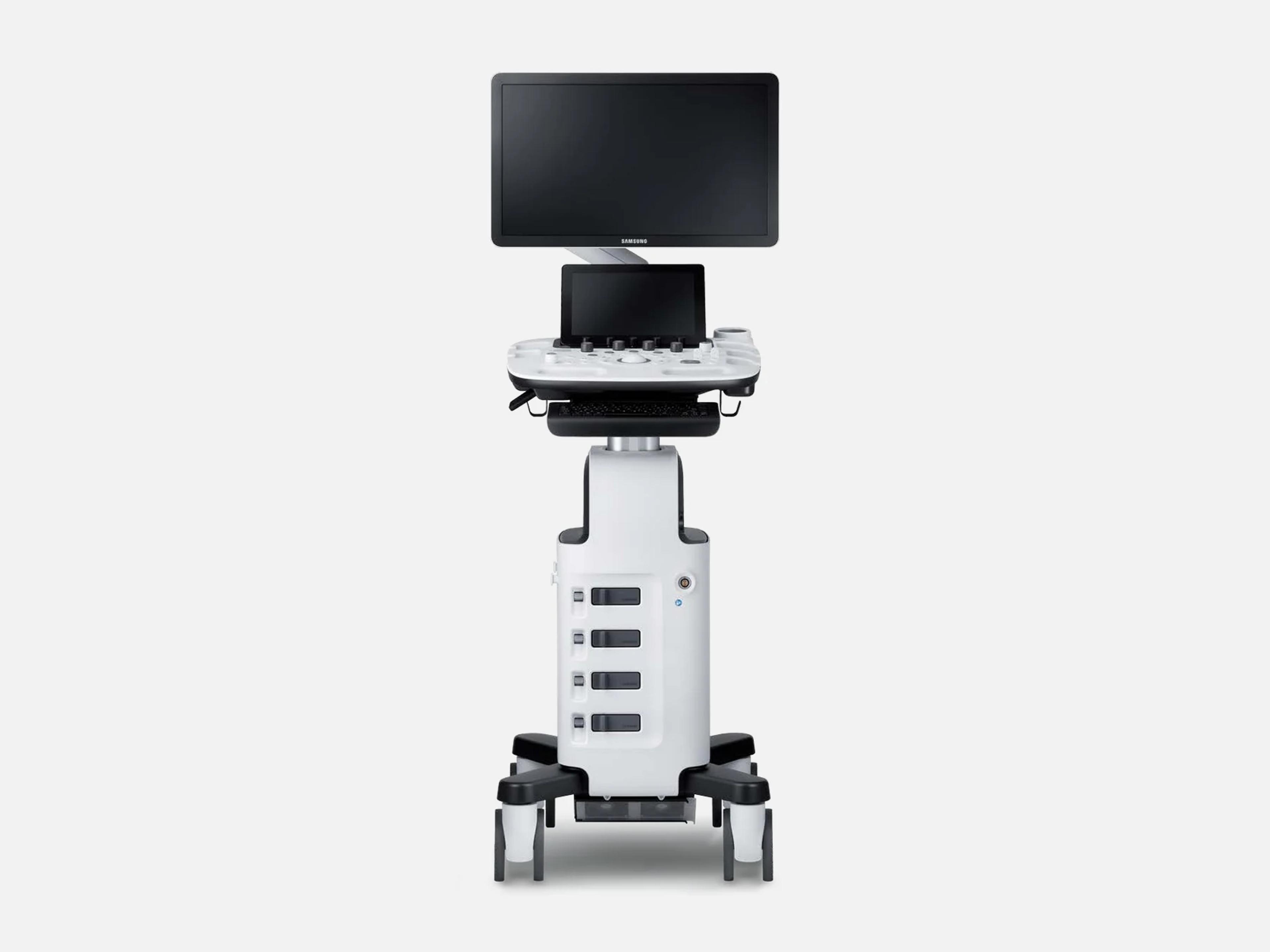
The Samsung HS40 is a cart-based ultrasound system for routine OB/GYN and women's health exams, in Samsung's Women's Health and General Imaging lines. It weighs 54 kg without accessories and carries a 21.5-inch monitor, a 10.1-inch touch screen and 3 or 4 active probe ports. Samsung launched it in 2017 as an entry-level system; later HS40 clearances added features from the HS50/HS60, its FDA predicate.
- Released
- 2017launched by Samsung
- Probe ports
- 3 or 4active, by configuration
- Display
- 21.5-inchLED monitor, 1,920 x 1,080
- Weight
- 54 kgwithout accessories
Compatible probes
Linear
- LA3-16AD
Convex & microconvex
- CA2-8AD
- CA4-10M Added in 510(k) K210426
- CF4-9 Micro-convex
- VN4-8 Volume (3D mechanical)
Phased
- PN2-4
Endocavity
- EVN4-9
- V5-9 Volume (3D mechanical)
Specialty
- DP2B Pencil (CW) probe
Specifications
Display
- Main monitor
21.5-inch LED monitor, 1,920 x 1,080 (16:9), 16.7 M colors21.5-inch high-resolution LED monitor (LCD monitor with LED backlight unit); resolution 1,920 x 1,080 (16:9); 16.7 M colorsShow allShow less
- Main monitor brightness
- Adjustable
- Touch screen
- 10.1-inch high-resolution LED touch screen; resolution 1,280 x 800; capacitive touch type
- Monitor arm
Swivel ±160°, lift 180 mm; tilt +10°/-75° (2023 spec), +25°/-70° (2017 spec)Fully articulating monitor arm. 2023 specification: swivel ±160°, tilt +10° / -75°, lift 180 mm. 2017 specification: swivel ±160°, tilt +25° / -70°, lift 180 mm.Show allShow less
Physical
- Dimensions
- Height 1,354-1,620 mm (with monitor), width 520 mm, depth 730 mm
- Weight
- 54 kg without accessories; approx. 57 kg with safe working load
- Casters
- 4 swivel casters: 4 locking, or 3 locking + 1 non-locking
- Control panel
Height adjustment 100 mm (2023 spec), 180 mm (2017 spec); trackball, 4 user keysHeight-adjustable operating panel: height adjustment 100 mm (2023 specification), 180 mm (2017 specification); 10.1-inch touch screen with virtual alphanumeric keyboard; alphanumeric keyboard optional; trackball; 4 user keys; tri-status backlit; interactive dynamic software menu; 5 probe holders; endocavity transducer holder side-mounted on the consoleShow allShow less
- Console storage
Side storage, rear tray, printer storage, front handle; optional gel warmerSide storage (tablet, patient charts); rear tray (endocavity transducer and other items); built-in printer storages; printer cover; front handle; gel warmer (optional; two-level adjustable)Show allShow less
Power & battery
- Power
100-240 VAC, 50/60 Hz; max. 620 VA with peripherals100-240 VAC, 50/60 Hz; power consumption max. 620 VA with peripherals; built-in equipotential circuitShow allShow less
- Battery
- Optional 14.4 VDC, 6900 mAh, 99.36 W lithium-ion (2023 spec)
- Scan time on battery
- 30 min (basic mode live scan)
- Charging time
- About 5 hours
- Wake-up from sleep mode
- About 30 sec
- BatteryAssist™
Battery power for scanning and transport; sleep mode in place of shutdownBattery power for scanning and system transport when external power is unavailable; sleep mode in place of full shutdownShow allShow less
Connectivity & options
- Probe ports
3 or 4 active (optional/selectable); CW probe connector optional3 or 4 active probe ports (optional / selectable); CW probe connector optional; probe-select-assembly options 3P Connector PSA and 4P Connector PSA, each also with a pencil probe portShow allShow less
- DICOM 3.0
Media, PPS, Print, Storage, Storage Commitment, SR, Verification, WorklistMedia, Performed Procedure Step (PPS), Print, Storage (including ultrasound image and multiframe storage), Storage Commitment (SC), Structured Reporting (SR, including comprehensive SR), Verification, WorklistShow allShow less
- IHE
SWF, PIR, PDI, EDScheduled Workflow (SWF), Patient Information Reconciliation (PIR), Portable Data for Imaging (PDI), Evidence Documents (ED)Show allShow less
- USB
- USB 2.0, 6 ports
- Network
- Ethernet 10/100/1000BASE-T; wireless LAN
- Rear panel
- Audio output (right/left), VGA monitor, S-Video output, LAN, USB, HDMI output
- Video printers
- B/W UP-D897, UPD898MD, UP-X898MD, P95DW, P95D; color UP-D25MD, CP30DW
- USB line printers
- CLP-620NDK, ML-2950
- DVD recorder
- DVO-1000MD (S-video, NTSC/PAL, recording only)
- Other peripherals
- USB 2.0 foot switch (IPX 8), ECG (AHA / IEC), barcode/card reader
- Options (version 1.05)
- 2D NT, 5D Follicle™, XI STIC, Mobile Export
- System features and options
ElastoScan, Strain+, E-Strain, StressEcho, Panoramic, NeedleMate+, RIS Web BrowserElastoScan; Strain+; E-Strain; StressEcho; Cardiac Measurement; CW Function; Panoramic; Panoramic+; NeedleMate+; Expanded Storage (1TB); Q-Path / Q-View; RIS Web BrowserShow allShow less
Imaging & software
- Revision and software
Version 1.00, Version 1.05, V1.06; the Service screen displays the installed versionSystem Version 1.00; Version 1.05; V1.06 (a published 2024 label, not the installed build of any given unit). A unit's installed software version is displayed on the Service screen in the Utility menu.Show allShow less
- Beamforming
- Hybrid full digital beam-forming
- Frequency range
- 2-16 MHz
- Displayed imaging depth
- 2-38 cm (probe dependent)
- Maximum frame rate
- Over 2,000 fps
- Gray scale
- 256 shades of gray; system internal dynamic range 256
- Imaging modes
2D, M, Color M, Color Doppler, PW, CW, TDI, TDW, Power Doppler, ElastoScan, 3D/4D2D-Mode, M-Mode, Color M-Mode, Anatomical Mode, Color Doppler Mode, Pulsed Wave (PW) Spectral Doppler Mode, Continuous Wave (CW) Doppler Mode, Tissue Doppler Imaging (TDI) Mode, Tissue Doppler Wave (TDW) Mode, Power Doppler (PD) Mode, ElastoScan Mode, 3D/4D/XI STIC imaging Mode, Freehand 3D Mode, Dual Mode, Quad Mode, Combined Mode, Simultaneous Mode (Real-Time Triplex), Zoom Mode, S-Flow ModeShow allShow less
- Doppler velocity range
- PW 0.1 cm/s - 8.8 m/s; CW 1 cm/s - 19.3 m/s
- Image processing
CrystalLive™ Imaging Engine, S-Harmonic™, ClearVision, MultiVision, HQ-Vision, FSICrystalLive™ Imaging Engine; S-Harmonic™; ClearVision (noise-reduction filter); MultiVision (spatial compounding); HQ-Vision; Frequency Compounding (FSI); S-Flow™ (directional power Doppler)Show allShow less
- Reproductive-medicine tools
- S-Flow™, LumiFlow™
- 3D/4D
3D XI™, XI STIC™, 4D, RealisticVue™, CrystalVue™, Freehand 3D, Free Angle Plane3D XI™ (Multi-Slice View, Oblique View, Volume CT); XI STIC™; 4D; RealisticVue™; CrystalVue™; Freehand 3D; Free Angle Plane (with the V5-9)Show allShow less
- Automated measurement and AI
BiometryAssist™, UterineAssist™, LaborAssist™, 5D NT™, 2D Follicle™, NerveTrack2D Follicle™; BiometryAssist™; UterineAssist™ (deep-learning uterine measurement, added in 510(k) K221599); LaborAssist™; 5D NT™; 5D Follicle™; NerveTrack (added in 510(k) K210426, nerve types expanded in K221599); S-Detect for Breast; AutoIMT+; EzAssist™; 2D NT. Some features are optional and may require additional purchase.Show allShow less
- Workflow
EzExam+™, QuickPreset, HelloMom™, EzCompare, QuickScan™, SonoView™, Report PackageEzExam+™; QuickPreset; HelloMom™ (requires optional Mobile Export); Mobile Export; EzCompare; QuickScan™; SonoView™; Report Package; over 30 user-programmable presets; 4 user-programmable keysShow allShow less
- Boot-up and probe change
- Boot-up max. 180 sec; probe change 2-3 sec
- Processor and memory
i3-8100H, 8 GB (2023 spec); Bald Eagle RX-425BB, 8 GB (2017 spec)2023 specification: i3-8100H main processor, 8 GB main memory, integrated PC module. 2017 specification: Bald Eagle RX-425BB main processor, 8 GB main memory.Show allShow less
- Operating system
Windows10 IoT Enterprise (2023 spec); Windows Embedded Standard 7 (2017 spec)Windows10 IoT Enterprise (2023 specification); Windows Embedded Standard 7 (2017 specification); the 2020 K200339 configuration supports Windows 10Show allShow less
- Storage
Built-in 512 GB SSD (2023 spec), 0.5 TB HDD (2017 spec); Expanded Storage (1TB)Built-in 512 GB SSD (2023 specification); built-in 0.5 TB HDD (2017 specification); Expanded Storage (1TB); DVD-RWShow allShow less
- Cine and loop memory
- Cine max. 45,000 frames; loop max. 14,000 lines
Environment
- System noise
- Under 40 dBA (max.)
- Heat dissipation
- 2,729.7 BTU/h
Compliance
- FDA 510(k)
K172129 (Aug 8, 2017), K180409, K191055, K200339, K210426, K221599 (Aug 22, 2022)K172129 (decided August 8, 2017; the first), K180409, K191055, K200339, K210426, K221599 (decided August 22, 2022). HS40 Diagnostic Ultrasound System; Class II, 21 CFR 892.1550; product codes IYN, IYO, ITX.Show allShow less
- CE marking
- Affixed April 14, 2017
What to check when buying a used Samsung HS40
Have the electrical safety tested before use
The unit's maintenance state affects its electrical safety, and only properly trained persons may carry out the safety inspection.
How: Have a properly trained technician measure leakage current with the system on a grounded power supply, and keep a unit that fails out of patient use.
Inspect each probe's lens, housing and insulation
A damaged probe or damaged electrical insulation can cause electric shock, so a probe with any defect comes out of use at once.
How: Look for cracks, broken parts, leaks, sharp edges and damage to the lens, strain relief, cable and connector, and ask whether any probe has struck the floor or a hard surface.
Inspect the console housing, covers and cords
A cracked or chipped housing or a worn cable makes the system unsafe to use.
How: Before powering up, look over the housing, every cover, the power cord and each cable for cracks, chips and wear.
Check the power inlet, breaker and auxiliary outlet
The system must run from a grounded power supply without extension cords or multiple outlets, and its auxiliary outlet takes only the peripherals specified for it.
How: Find the rear-panel circuit breaker, which cuts power on overcurrent or overvoltage, and unplug any extension cord, power strip or unlisted device from the system and its auxiliary outlet.
Common questions about the Samsung HS40
Is the Samsung HS40 FDA-cleared?
Yes. The HS40 Diagnostic Ultrasound System is FDA-cleared under 510(k) K172129, decided August 8, 2017, as a Class II device under 21 CFR 892.1550 with product codes IYN, IYO and ITX.
Later 510(k) clearances, K180409, K191055, K200339, K210426 and K221599 (decided August 22, 2022), extended its probe list and software features.
What clinical applications is the Samsung HS40 cleared for?
Its 510(k) K221599 clears it for fetal/obstetrics, abdominal, gynecology, pediatric, small organ, neonatal cephalic, adult cephalic, trans-rectal, trans-vaginal, musculoskeletal (conventional and superficial), urology, adult and pediatric cardiac, and peripheral vessel imaging.
How is the Samsung HS40 related to the HS50 and HS60?
In FDA filings, the HS50/HS60 (K170493) was the HS40's predicate device, and the HS40 claimed no new functionality over it.
Later HS40 clearances added features migrated from the HS50/HS60: 2DNT, BiometryAssist, E-Strain, NeedleMate and AutoIMT in K191055, and S-Detect for Breast, 2D Follicle, LaborAssist and CrystalVue in K200339.
What does HS mean in the Samsung HS40?
HS is short for Hybrid System, the expansion Samsung gave when it launched the HS40 in 2017.