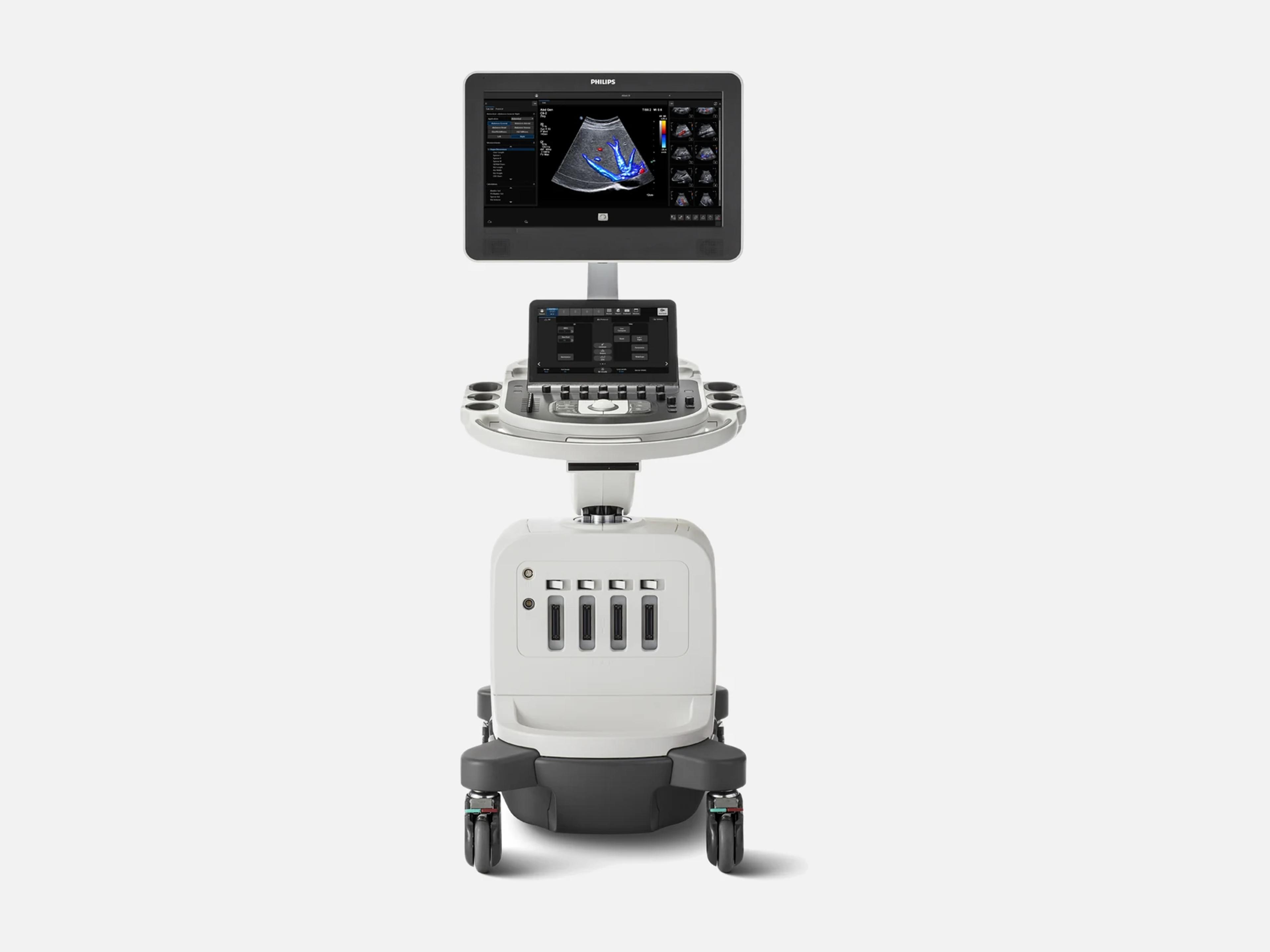
The Philips Affiniti 30 is a cart-based ultrasound system designed for daily use in a busy ultrasound practice. Its obstetric and gynecological transducers include the C6-2, C9-4v, V6-2 and 3D9-3v, and it runs Segmental Wall Motion for adult cardiac exams. Its siblings include the Affiniti 50 and the Affiniti 70, the most advanced system in the Affiniti family, and it shares their user interface.
- Probe ports
- 4transducer receptacles
- Display
- 21.5-inch54.6 cm, wide-format HD
- Weight
- 83.6 kg
Compatible probes
Linear
- L12-4
- L12-5 Also labeled L12-5 50; OB/GYN
Convex & microconvex
- C6-2 OB/GYN
- C8-5 Pediatric
Phased
- S4-2
- S8-3 Pediatric
Endocavity
- C9-4v Intracavity; OB/GYN
Specialty
- 3D9-3v 3D; OB/GYN
- X7-2t From Release 5.0; 2D only as of 2020
- D2cwc
- D5cwc
Specifications
Display
- Monitor
- 21.5-inch (54.6 cm) wide-format, high-definition flat-panel TFT/IPS monitor
- Touch screen
- 12-inch full-color touchscreen, tablet-like, with image replication and TGC controls
Physical
- Weight
- 83.6 kg
- Weight, earlier specifications
- 84.1 kg excluding transducers, peripherals and accessories (2020); 83.5 kg (2018)
- Dimensions
- Width 57.2 cm; height 142.2–162.6 cm; depth 98.3 cm
- Depth, earlier specification
- 85.0–93.3 cm (2020)
- Transducer receptacles
- Four
- Control panel
- 180 degrees of movement; 20.3 cm height adjustment
- Cable management
- Easy clip cable management
Power & battery
- Power
- 100–240 V AC, 50/60 Hz; 450 VA, depending on system configuration
- Battery
- AC-only operation (2020 specification)
- Versus predecessor (HD15)
- Nearly 40% less power, and 16% lighter
Connectivity & options
- DICOM
Worklist, network storage, structured reports, storage commitment, MPPS, Q/R, printingModality Worklist; storage of images and structured reports to network storage; storage commitment; printing to networked DICOM printers; Query/Retrieve of prior images; Modality Performed Procedure Step. On Release 12.0.x, network storage, structured reports, worklists, storage commitment and performed-procedure-step services come with the purchasable Netlink DICOM 3.0 option; DICOM printing needs no option.Show allShow less
- Query/Retrieve
- Needs Ultrasound Query Retrieve or Multi-Modality Query Retrieve (Release 12.0.x)
- Export
- Images and structured reports to CD, DVD or removable USB media, and to network storage
- Connectivity
- Wireless capability, network share transfer, printer connection, structured reporting
- Collaboration Live
- Remote communication and collaboration
- Remote services
Philips remote services network over ISSL; OmniSphere Remote Technical Connect for biomedConnection to the Philips remote services network over ISSL through the site's Internet access point; OmniSphere Remote Technical Connect gives in-house biomed staff remote access. Not every service is offered in every region, and some may require a service contract.Show allShow less
- Security
Firewall, OS hardening, access levels, LDAP, auto logoff, disk encryption, audit logsFirewall blocking unnecessary ports; operating system hardened to DISA STIGs; option to disable export of patient data to removable media; three access-control levels; local and LDAP/Active Directory user management; password policies; auto logoff; hard drive encryption (128 or 256 bit, with or without diffuser); configurable login banner; audit log export via syslog (UDP or TLS).Show allShow less
- Security options
- Safeguard (malware whitelisting) and Security Plus, both purchasable
Imaging & software
- Imaging modes
B, M, PW and CW Doppler, color Doppler, Color M, Power Doppler, harmonic, combined modesB-mode, M-mode, pulsed-wave Doppler, continuous-wave Doppler, color Doppler, Color M-mode, Power Doppler, harmonic imaging and combined modes.Show allShow less
- Color imaging modes
- CFM, CPA, CPAd, MFI; MFI HD not available on the Affiniti 30 (December 2024)
- Revision and software
Elevate Plus; releases 1.8.x, 2.0.x, 3.0.x, 4.0.x, 5.0, 6.0, 11.0, 12.0.x, 13.0.xRelease name Elevate Plus. Releases documented for the Affiniti 30: 1.8.x (May 2017), 2.0.x (February 2018), 3.0.x and 4.0.x (November 2018), 5.0.x (May 2019; Release 5.0 brought the X7-2t in June 2019, dates varying by market), 6.0, 11.0 or higher, 12.0.x and 13.0.x (April 2025). SVS v2 Contrast runs on VM13.0 or higher.Show allShow less
- Flow Viewer
- 3D-like rendering of color flow for vasculature and fetal heart, in all color modes
- Next Gen Auto Scan
- Adaptive pixel-by-pixel, real-time image brightness optimization
- Real-time iSCAN (AutoSCAN)
- Automatic, continuous gain and TGC optimization in 2D, 3D or 4D
- Color gain post processing
- Adjusts color gain after capture
- Tissue Specific Presets (TSP)
- Adjust more than 7,500 parameters for each exam type
- Adv. Breast preset
- Available from Release 6.0
- SmartExam
- Guided protocols: planning, processing, annotation, mode switching, missed-view alerts
- Fetal scanning protocols
- User-created protocols for all trimesters and specialty exams such as trisomy 13 and 21
- 3D/4D
- 3D/4D imaging with 3D presets; iSlice tomographic viewing of volume data
- QLAB
- AutoStrain LV; GI 3DQ editing and measurements on 3D data sets
- Q-Apps
- Advanced analysis and image presentation of volume imaging
- Further features
- TrueVue, GlassVue, FlexVue, Auto Doppler
- MaxVue
- Available from Release 6.0
- Strain elastography
- For breast and gynecology exams
- Liver assessment
- Liver fat quantification and liver stiffness assessment
- GI contrast enhanced ultrasound (CEUS)
- Purchasable option from Release 6.0
- Segmental Wall Motion (SWM)
- Automatic segmental LV function evaluation from adult TTE exams
- Smart Doppler View ID
- AI selection of the Doppler calculation package group; software 11.0 or higher
- SVS v2 Contrast
- Adult cardiac image selection, on VM13.0 or higher
- On-cart transducer test
- Transducer test run on the system, without a phantom
- Transducer usage tool
- Per-transducer usage data, sortable by exam type
- Service Request button
- Support requests entered from the control panel
Compliance
- FDA 510(k)
K172607, K181485, K182857, K201012, K233788, K240850, K251455; Class II, 21 CFR 892.1550K172607 (decided 2017-10-04); K181485 (2018-07-27); K182857 (2018-11-09); K201012 (2020-05-01); K233788 (2024-02-13, Smart Doppler View ID, Affiniti Series); K240850 (2024-04-24, Segmental Wall Motion, Affiniti Series); K251455 (SVS v2 Contrast, on VM13.0 or higher). Class II, 21 CFR 892.1550, product codes IYN, IYO, ITX.Show allShow less
- Indications for use
Abdominal, cardiac, cephalic, fetal/obstetric, gynecological, MSK, pediatric, vascular…Under K201012, diagnostic ultrasound imaging and fluid flow analysis: abdominal; cardiac adult; cardiac other (fetal); cardiac pediatric; cerebral vascular; cephalic (adult); cephalic (neonatal); fetal/obstetric; gynecological; intraoperative (vascular); intraoperative (cardiac); musculoskeletal (conventional); musculoskeletal (superficial); urology; pediatric; peripheral vessel; small organ (breast, thyroid, testicle); transesophageal (cardiac); transrectal; transvaginal. In clinics, hospitals and at the clinical point of care. The later Affiniti Series clearance K240850 adds lung.Show allShow less
What to check when buying a used Philips Affiniti 30
Check every 3D9-3v against recall Z-2517-2023
On listed 3D9-3v transducers, the two bonded parts of the chassis can come apart, with a risk of tissue damage and electric shock if built-in safety measures also fail.
How: Match the transducer's serial number against the recall list, ask for proof that an affected probe was exchanged by Philips field service, and inspect the housing for any separation.
Inspect the C9-4v membrane, tip and head joint
Reports on C9-4v probes used with the Affiniti 30 describe a damaged membrane exposing metal that failed an electrical leakage test, a cracked tip, a fracture where the tip attaches and a head separating from the body.
How: Look closely at the membrane, the tip and the joint between head and body for exposed metal, cracks or gaps, and have a biomed run an electrical leakage test on the probe.
Inspect the monitor arm, knuckle and mounting
Affiniti 30 monitors have detached or broken off in transport, from cracks in a porous cast aluminum knuckle or from sheared screw threads, and a 2019 design change added a tab and slot to the screws holding the arm.
How: Look for cracks at the knuckle, confirm the monitor sits firmly on its tilt swivel arm, and ask how the unit has been moved and shipped.
Check patient-data recalls on software up to 5.0.1
On software from 1.0 to 5.0.1, uncommon workflows could display and save incorrect patient data in an exam, and on 4.0, using Edit on the Patient Data Entry screen could move an image into another patient's folder.
How: Press Support on the control panel, click System Information under System Management and read the Software Information section, then on an affected version ask for the correction record of recall Z-0864-2021, and of Z-2199-2019 on 4.0.
Common questions about the Philips Affiniti 30
What is the difference between the Affiniti 30, 50 and 70?
The three share the same user interface, and the Affiniti 70 is the most advanced system in the family. Some features stop short of the Affiniti 30: needle visualization is limited to the Affiniti 70, and as of December 2024 the mL26-8 transducer and MicroFlow Imaging HD were not available on the Affiniti 30.
Transducer support differs too. As of 2020, the X7-2t ran in 2D only on the Affiniti 30 and 50, while the Affiniti 70 supported all its modes. Under the 2017 clearance K172607, the C5-1, C9-2, L12-3 and S5-1 were cleared for the Affiniti 70 only, and the C10-4ec, L15-7io, S7-3t and X7-2t for the Affiniti 70 and 50; the X7-2t reached the Affiniti 30 with Release 5.0.
Is the Philips Affiniti 30 discontinued?
No. The Affiniti 30 remains in Philips's US catalog, with the Elevate Plus software release. US 510(k) clearance of Elevate Plus for EPIQ Elite and the Affiniti series was announced on June 2, 2026; the announcement names the series rather than the Affiniti 30 itself.
Is the Philips Affiniti 30 FDA-cleared?
Yes. The Affiniti 30 is FDA-cleared under 510(k) as a Class II device (21 CFR 892.1550, product codes IYN, IYO and ITX). It is named in K172607, decided on October 4, 2017, and in K181485 (July 27, 2018), K182857 (November 9, 2018) and K201012 (May 1, 2020).
Later Affiniti Series clearances cover features it runs: K233788 (February 13, 2024) for Smart Doppler View ID on software 11.0 or higher, K240850 (April 24, 2024) for Segmental Wall Motion, and K251455 for SVS v2 Contrast on VM13.0 or higher.