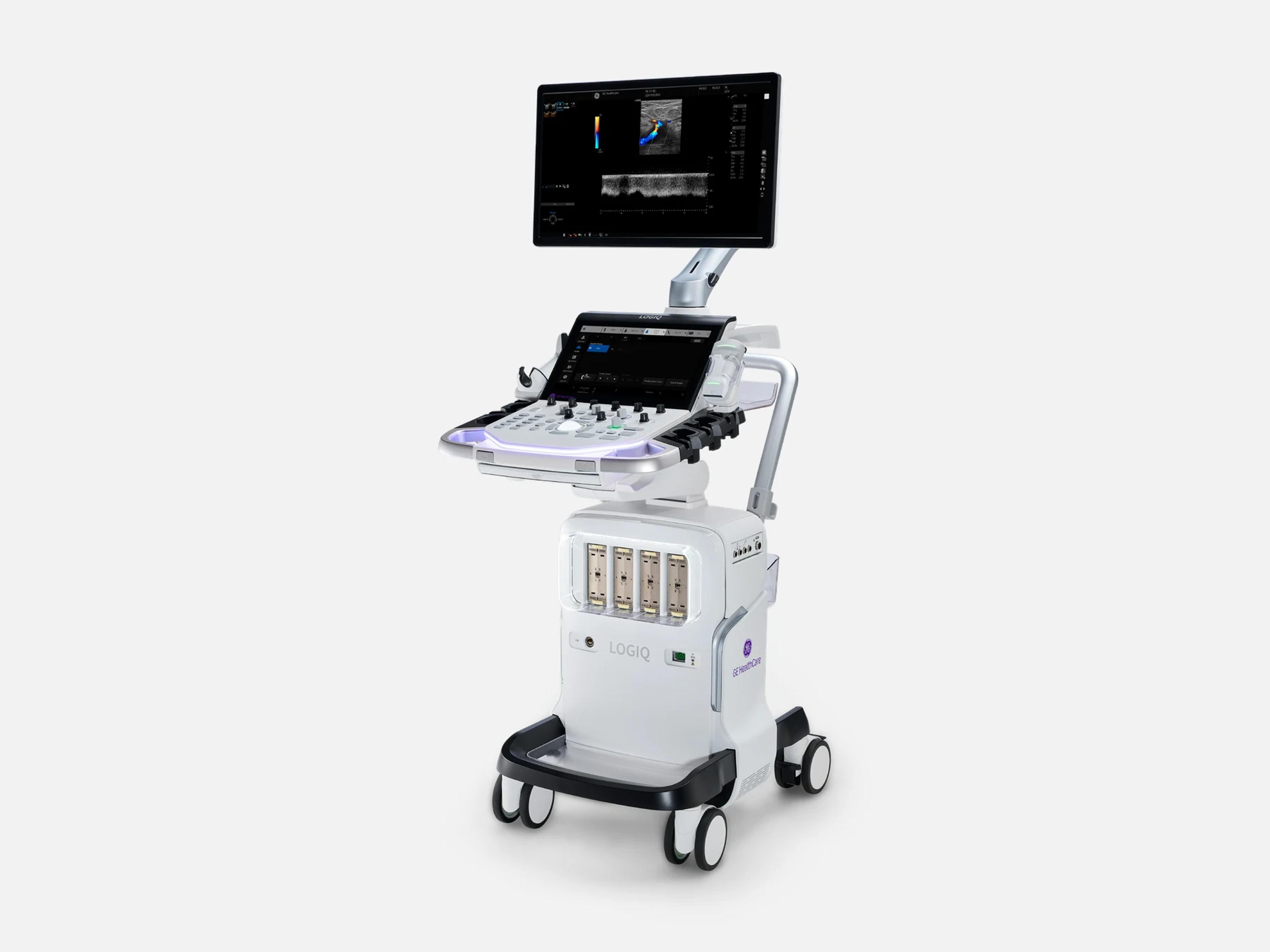
The GE LOGIQ Totus is a cart-based general-imaging system with AI-powered workflow and decision-support tools, aimed at head-to-toe imaging. Its cleared uses span obstetrics, abdominal and small-organ exams, cardiac, peripheral vascular and musculoskeletal imaging, in hospitals and clinics. Within the LOGIQ family it has the Auto Abdominal Suite 1.0 tools, while the LOGIQ E10 Series and LOGIQ Fortis carry Suite 2.0.
- Released
- 2024launched by GE
- Probe ports
- 4DLP, plus optional CW port
- Display
- 23.8-inch1920 × 1080, LCD or HDU
- Weight
- approx. 73 kg160.9 lb, no accessories
Compatible probes
Linear
- 9L-D
- L2-9-D Needs the Advanced Probe Option
- L2-9VN-D Needs the Advanced Probe Option
- L3-9i-D Added in K253370
- L3-12-D
- ML6-15-D
- L4-20t-D Button probe; added in K253370
- L6-24-D
Convex & microconvex
- C1-6-D Needs the Advanced Probe Option
- C1-6VN-D Needs the Advanced Probe Option
- C2-7-D
- C2-7VN-D
- C2-9-D Added in K253370; needs the Advanced Probe Option
- C2-9VN-D Needs the Advanced Probe Option
- C3-10-D Needs the Advanced Probe Option
- RAB6-D
Phased
- M5Sc-D Needs the Advanced Probe Option
- 6S-D
- 9S-D
- 12S-D
Endocavity
- IC5-9-D
- RIC5-9-D
Specialty
- 6Tc-RS Transesophageal; added in K253370
- P2D
- P6D
- Vscan Air CL Wireless dual probe; uses the 2nd Wireless LAN option
Specifications
Display
- Display
- 23.8-inch widescreen monitor, LCD or HDU build, 1920 × 1080 resolution
- Touch panel
- 14-inch capacitive LCD touchscreen on the control panel
Physical
- Weight
- Approx. 73 kg (160.9 lb) without accessories; approx. 85 kg (187.4 lb) fully configured
- Dimensions
Width 490 mm base, 545 mm (LCD) or 565 mm (HDU) at the monitor; depth 835 mmWidth: 490 mm (19.3 in) at the base; 545 mm (21.5 in) with the LCD monitor; 565 mm (22.2 in) with the HDU monitor. Depth: 835 mm (32.9 in).Show allShow less
- Probe ports
- Four DLP probe ports, plus an optional CW probe port
- Controls
14-inch touch screen, trackball, encoder knobs, joystick controls, programmable keys14-inch LCD touch screen; touch panel with joystick controls, on-screen keyboard, user-defined and programmable keys; trackball; operator-panel encoder knobs; measurement and comment controls; two Type-A and two Type-C USB ports and a microphone at the panel; optional physical alphanumeric keyboard.Show allShow less
- Operator panel
- Top console swivels left and right, with powered up/down adjustment and a front handle
- Monitor arm
- Moves up, down, left and right, about 350 mm horizontally from center
- Casters and brakes
- A brake pedal on each wheel; swivel lock on the left rear wheel
Power & battery
- Power
100–240 VAC (±10%), 50/60 Hz; 0.65 kVA with monitor and on-board peripherals100–240 VAC (±10%), 50/60 Hz; 0.65 kVA power consumption including the monitor and on-board peripherals. Requires dedicated power and ground, and a center-tapped power source on 220 V.Show allShow less
- Inrush
- Console only, estimated: 25 A max (< 0.2 ms) at 115 VAC; 50 A max (< 0.2 ms) at 230 VAC
- Battery
Optional 4S2P Li-ion packs (14.4 V, 5900 mAh); extended option keeps scanning unpluggedOptional lithium-ion battery (Battery Pack Option and Battery Pack extended Option): replaceable 4S2P packs, 14.4 V, 5900 mAh each. With the battery option the system switches to battery when AC power is lost; with the extended option, scanning continues unplugged without shutdown (Scan-on-Battery).Show allShow less
- Battery operation
Approx. 1 h powered operation on three packs, 2 h on six (fresh, fully charged)Approximately 1 hour of powered operation with three packs or 2 hours with six, using a fresh, fully charged battery; a powered-operation figure, not a guaranteed continuous scanning time.Show allShow less
Connectivity & options
- Network
Gigabit Ethernet (10/100/1000 Mbps); IPv6-ready, IPv4 or IPv6 but not mixedGigabit Ethernet LAN port (10/100/1000 Mbps Ethernet/DICOM connection); the LAN is IPv6-ready and runs IPv4 or IPv6, not a mix; DICOM uses port 104.Show allShow less
- Rear I/O panel
- Ethernet, two USB 3.0, HDMI, DP, VGA, composite, S-Video, audio out, status indicators
- USB
- Two Type-A and two Type-C at the operator panel; two USB 3.0 user ports at the rear
- Wireless
- Optional wireless LAN; a 2nd wireless LAN option for Vscan Air; Bluetooth for LOGIQ Apps
- DICOM
R5.x: Worklist, Query/Retrieve, Storage, SR, Print, MPPS, Export/Import, STOW-RS…For LOGIQ Totus R5.x: DICOM Worklist Download, Query/Retrieve, Storage, SR Storage, Print, Modality Performed Procedure Step (MPPS), Export/Import, STOW-RS User Agent, and Storage Commitment (SCU of the Push Model).Show allShow less
- Remote service
- InSite remote service over HTTPS on port 443, opened on user request
- Device Management
- Outbound fleet-management connection over SSL/TLS on port 443; Ethernet required
- Verisound Fleet
- Centralized fleet management; Detailed Restore pushes preset categories from a server
- MyGEHealthCare
- Can monitor how much the system is used
- Ultrasound Excellence
- Analytics covering GE systems and those of other makers
- Verisound Collab
- Secure, real-time remote access to exams for colleagues; not for diagnostic use
- Digital Expert
- Remote interaction with colleagues for support
- Digital Expert Connect
- Digital support and service offering
- LOGIQ Apps
Android apps over Bluetooth: LOGIQ Remote controls the system; LOGIQ Photo adds photosLOGIQ Apps for Android devices over Bluetooth: LOGIQ Remote adjusts controls such as depth, B-mode, PW and color-flow gain, color flow scale, measurements, comments, trackball, freeze and store; LOGIQ Photo captures photos into the patient's exam.Show allShow less
- LOGIQ AppAPI
Open platform for third-party apps and research tools, opened from App API LaunchpadOpen platform giving access to third-party apps and custom research tools, reached through App API Launchpad; AppAPI RoundTrip came with K253370, and KOIOS Lite runs as an AppAPI application.Show allShow less
- KOIOS Lite
- Licensed third-party AppAPI app; cannot be active alongside KOIOS Enterprise
- Security
SonoDefense: full disk encryption of system and user partitions, RFID badge log-inSonoDefense, GE's layered cybersecurity approach: encryption of the system and user partitions (encryption of the SSD system partitions is required), and an integrated RFID reader for badge log-in once the reader is installed and the card activated.Show allShow less
- Advanced Anonymization
- Lets the user choose which data is anonymized
- Clean Pixel Tag
- Sends PACS a clean image with annotations, measurements, calipers and scale removed
- Send Images via Email
- Added in the K253370 configuration
- Data streaming
- Streams data to connected devices; Color Flow added to Raw Data streaming in K253370
- eDelivery (Direct to Device)
- Downloads and installs software updates on the system; K253370 adds the OS base image
- Tricefy
- Software option; removed in the K253370 configuration
- External peripherals
USB drives, USB color inkjet and report printers, 3-button USB footswitch, DICOM printersCustomer-supplied USB flash drives and hard drives, USB hard disk drives, USB color inkjet printer, report printer, 3-button USB footswitch, DICOM network printers, digital black-and-white and color printers, the rolling Volume Navigation stand, option tray and probe holders.Show allShow less
- Hardware options
Realtime 4D, CW Doppler, Pencil CW, S-Video, ECG, battery packs, V Nav, wireless, printerRealtime 4D Option (DC4D), CW Doppler Option (GCW), Pencil CW Option, S-Video (VCS) Option, Patient I/O (ECG) Option, Battery Pack Option, Battery Pack extended Option, Volume Navigation (VNAV) Option, Wireless Option, Printer (Digital Graphic) Option, 2nd Wireless LAN Option for Vscan Air, Tablet Option and Vscan Air Charger Option.Show allShow less
- Realtime 4D Option (DC4D)
- Real-time 4D hardware option, checked with the RAB6-D or RIC5-9-D probe
- Patient I/O (ECG) Option
- Optional ECG that can trigger measurements and show on screen
- Advanced Probe Option (H46612LS)
- Activates C1-6-D, C1-6VN-D, C2-9-D, C2-9VN-D, C3-10-D, L2-9-D, L2-9VN-D and M5Sc-D
Imaging & software
- Imaging modes
B, M, PW, optional CW, Color, Power Doppler, harmonic, 3D/4D, elastography, contrast…B, M, PW Doppler, CW Doppler (optional), Color Doppler, Color M Doppler, Power Doppler, Harmonic Imaging, Coded Pulse, 3D/4D Imaging, Elastography, Shear Wave Elastography, Attenuation Imaging and Contrast Enhanced Imaging; combined B/M, B/Color, B/PWD, B/Color/PWD and B/Power/PWD.Show allShow less
- Revision and software
R4.x.x (models 5926013, 5943511 HDU); R5.x.x (9685090 LOGIQ Totus R5, 9685091 R5 HDU)Two software generations: R4.x.x on models 5926013 (LOGIQ Totus) and 5943511 (LOGIQ Totus HDU); R5.x.x on models 9685090 (LOGIQ Totus R5) and 9685091 (LOGIQ Totus R5 HDU).Show allShow less
- Operating system and processing
Windows 10 Embedded on an SSD; digital beamforming; single-slot GPU in the back endWindows 10 Embedded base image with drivers for approved devices and peripherals, on the SSD of the UEPP-T board; the UBE-T back end pairs a COM Express single-board computer with the main power supply and hosts a single-slot GPU card, changed in K253370 for end of life; digital beamforming.Show allShow less
- Acquisition board
- UAC-T board with 128 channels; not a total system-processing channel count
- Storage
- 1 TB M.2 SSD, with full disk encryption available; USB drives supported
- cSound Architecture
- Image reconstruction with all pixels in focus, from near field to depth
- Advanced Speckle Reduction Imaging (SRI)
- Paired with cSound for image uniformity and resolution from near field to depth
- Continuous Automated Tissue Optimization (CATO)
- Continuous, automatic adjustment of image uniformity and contrast resolution
- Adaptive Contrast Enhancement (ACE)
- Extended on R5 from liver imaging to more applications; thyroid added in K253370
- CrossXBeam
- Compounds frames acquired at multiple steering angles
- Virtual Convex
- Widens a linear probe's field of view
- B-Flow
- Flow imaging for micro vessels and slow flow
- Microvascular Imaging (MVI) with Radiantflow
- Flow mode for visualizing micro vessels and slow flow states
- 2D Flow Quantification
- Semi-quantitative information on the vascular pattern in a selected region of interest
- Contrast-Enhanced Ultrasound (CEUS)
- Visualizes and quantifies tissue perfusion and lesion vascularity
- 2D Shear Wave Elastography
Software option with a quality map, for quantitative evaluation of tissue elasticitySoftware option with a quality map for quantitative evaluation of tissue elasticity; the Shear Elasto key is absent unless the option is enabled, and its functional check uses an L2-9-D or C1-6-D probe.Show allShow less
- Strain Elastography
- Strain elastography, with a Shear Elasto/strain Elasto touch-panel key
- Ultrasound-Guided Fat Fraction (UGFF)
- Quantifies liver fat as a percentage, for adult imaging; added in K253370
- Ultrasound-Guided Attenuation Parameter (UGAP)
Non-invasive liver assessment for suspected MASLD, NASH or ASHA non-invasive technique for the identification, grading and monitoring of patients with suspected MASLD, NASH or ASH, as described in 2024.Show allShow less
- Hepatic Assistant
Shear wave elastography and a liver fat measurement in one workflow; with UGFF on R5Combines 2D shear wave elastography with a liver fat or attenuation measurement in one workflow at the push of a button; on R5 it pairs with UGFF, and 2024 descriptions paired it with UGAP.Show allShow less
- Liver leadership package
- Non-invasive quantitative liver tools, including UGFF and shear wave elastography
- Auto Abdominal Color Assistant 1.0
- Detects the anatomy and selects abdominal color-flow shortcuts in real time
- Auto Preset Assistant
- Detects the anatomy being scanned and activates the matching preset
- Auto Preset Selection
- In the original K232381 configuration
- Auto Renal Measure Assistant
- Detects the kidney and measures length, height and width; added in K253370
- Auto Doppler Assistant
- Detects flow direction, steers the color box, and places and angles the PW sample volume
- Auto Lesion Segmentation
- Traces lesion boundaries and generates 2D measurements
- OB Measure Assistant
- Detects fetal anatomy and places measurement tools on its boundaries
- SmartEdit
- Shortcut keys for segmentation-based editing in auto measurement tools
- Breast Assistant and Thyroid Assistant, powered by Koios DS
- On-board AI decision support: lesion risk aligned to a BI-RADS or TI-RADS category
- Compare Assistant
- Prior ultrasound, mammography, CT or MR study beside live images on a split screen
- Scan Assistant
- Personalized scanning protocols for standard or follow-up exams, at a touch
- Start Assistant
- Workflow productivity feature
- Smart Assistant
- Productivity feature, listed with Scan Assistant and Voice Control
- Voice Control
- Controls system settings by voice; expanded with support for more languages
- EZ Imaging
Customizable probe presets and a touch panel of frequent shortcuts; Ez Touchpanel 2.0Customizable probe presets and an updated touch panel showing frequently used models for connected probes and other shortcuts; Ez Touchpanel 2.0 came with K253370 as an improvement.Show allShow less
- Raw Data
- Image processing and quantification after the exam
- Volume Navigation (V Nav)
Fusion with CT, MR, PET/CT, CBCT, SPECT or 3D CEUS volumes; needle tip and GPS trackingImage-guided procedure option: fusion of real-time ultrasound with a volume DICOM dataset (CT, MR, PET/CT, CBCT, SPECT or 3D CEUS), needle tip tracking and 2D/3D GPS marker tracking; an internal hardware option with an optional rolling stand, checked with a supported VN probe and transmitter.Show allShow less
- Auto-Registration for fusion imaging
- One-click registration that manages patient motion, breathing and transmitter movement
- 2D/3D GPS Tracking
- Tracks position during a scan and marks selected points of interest
- B-Steer+
- Needle visualization during procedures
- Anatomical M-Mode
- Available; the fix when CHI M-Mode looks too dark with IC5-9 or RIC5-9 probes
- Probe Check
Optional licensed probe-health check by automated lens-echo acquisition; also VITAOptional feature (OAC license) using automated lens-echo acquisition for real-time probe health; called Automatic Probe Diagnostics (VITA) or VITAOnDemand on some releases and labeled Probe Check from R4; availability varies by region.Show allShow less
- Image Quality Check (IQC)
- Service preset for image-quality evaluation in fundamental B-mode, SRI and harmonics off
- Worksheets and Report Pages
- Generic and application-specific worksheets; results on customizable Report Pages
- ViewPoint Ultra
- On-scanner reporting (version 1.0), LOGIQ R5 systems only; available only in the US
- Auto EF without ECG
- Added in the K253370 configuration
- Auto EF/AFI Enhancement
- In the original K232381 configuration
Environment
- Operating
- 10–35 °C (50–96 °F), 30–80% humidity non-condensing, 70–106 kPa
- Storage and transport
- −10 to 50 °C (14–122 °F), transport under 16 hours; 30–80% humidity, 70–106 kPa
- Heat dissipation
- Up to 3070 Btu/hr with monitor and on-board peripherals
- Acoustic noise
- Under 48 dB(A) at 20 °C, measured 1 m from all four sides and 1 m above the floor
Compliance
- FDA 510(k)
- K253370 (2026-01-08), K232381 (2023-12-07); product code IYN
- Manufacturer of record
- GE Ultrasound Korea, Ltd.
What to check when buying a used GE LOGIQ Totus
Inspect the power cable, plug and inlet
A damaged power cable has to be swapped out before the system is used.
How: Look for a cable that stays curved past the plug's strain relief, bent pins or worn pin coating, burnt or damaged connector areas and exposed copper, and confirm the inlet connector's retainer holds.
Reject a damaged, leaking or deformed battery
A battery that smells, runs hot, is deformed or discolored, or behaves abnormally has to be removed and not used again.
How: On units with the battery option, inspect each pack for damage, leaks, odor, deformation and discoloration.
Have a biomed run the electrical safety tests
Grounding, chassis leakage and probe leakage tests show whether the console and each probe are electrically safe.
How: Ask for those tests on the console with every probe offered, plus electrical safety and image-quality checks on any probe moved from another system.
Inspect probe cables, strain reliefs and connector pins
A probe with damaged connector pins has to be taken out of service at once.
How: Look over each probe's cable, strain and bend reliefs and connector, check the footswitch cable for wear, and if a locking lever meets resistance, remove the connector rather than force it and look for misaligned or damaged pins.
Common questions about the GE LOGIQ Totus
Is the GE LOGIQ Totus FDA-cleared?
Yes. The LOGIQ Totus is FDA-cleared under 510(k) K232381, decided on December 7, 2023, as a substantially equivalent device under product code IYN. A second clearance, K253370, decided on January 8, 2026, added transesophageal and intraoperative applications; that later clearance does not by itself extend those two uses to every earlier unit.
What exams is the GE LOGIQ Totus cleared for?
In its K253370 configuration the LOGIQ Totus is cleared for fetal and obstetric, abdominal (including renal and gynecologic or pelvic), pediatric, small organ (breast, testes and thyroid), neonatal and adult cephalic, adult and pediatric cardiac, peripheral vascular, conventional and superficial musculoskeletal, urology (including prostate), transrectal, transvaginal, transesophageal and intraoperative (abdominal and vascular) imaging. It is intended for use in a hospital or medical clinic.
How does the LOGIQ Totus differ from the LOGIQ Fortis and LOGIQ E10 Series?
The LOGIQ E10 Series and LOGIQ Fortis carry Auto Abdominal Suite 2.0, while the LOGIQ Totus has the Suite 1.0 tools: Auto Abdominal Color Assistant 1.0, Auto Preset Assistant and Auto Renal Measure Assistant. At its first clearance the LOGIQ Totus shared the intended use of the LOGIQ E10s and LOGIQ Fortis, except transesophageal and intraoperative applications. It shared their probes too, plus the 9S-D and 12S-D.
What is the GE LOGIQ Totus HDU?
It is the LOGIQ Totus built with an HDU main monitor in place of the LCD. Both monitors are 23.8 inches; the HDU build is slightly wider, 565 mm against 545 mm, and carries its own model numbers: 5943511 on R4.x.x software and 9685091, the LOGIQ Totus R5 HDU, on R5.x.x.
What does Totus mean in the name GE LOGIQ Totus?
Totus is the Latin word for whole.