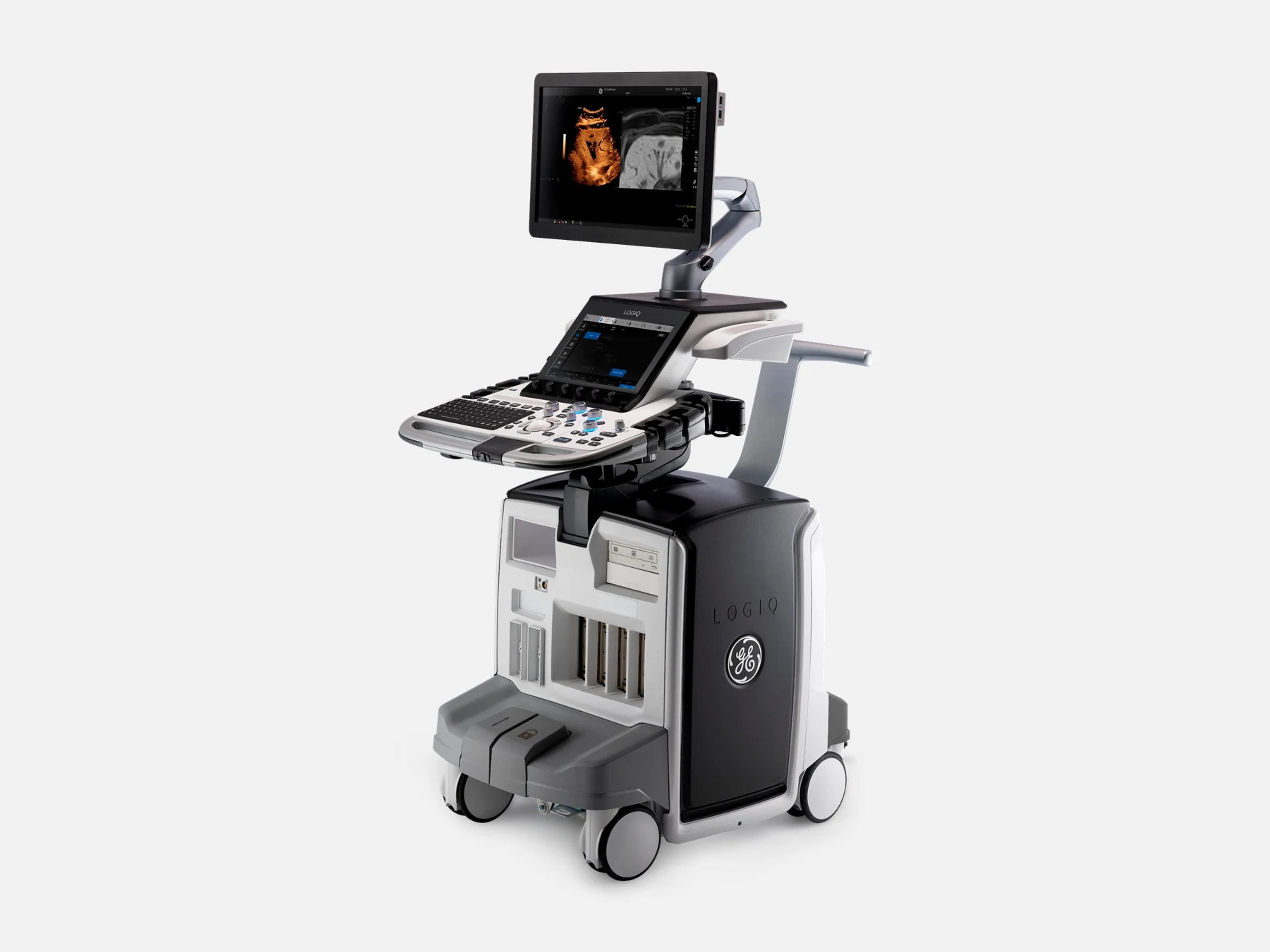
The GE LOGIQ E10s is a multipurpose general-imaging system for ultrasound departments, built for full-body imaging from head to toe and neonate to geriatric. It is one of two models in the LOGIQ E10 Series, alongside the LOGIQ E10, and shares two FDA 510(k) clearances with the LOGIQ Fortis. It has four DLP probe ports and a 22-inch OLED or 23.8-inch LED-LCD main monitor, with a touch-screen operator panel.
- Released
- 2020launched by GE
- Probe ports
- 4DLP; Pencil CW optional
- Display
- 23.8-inchHDU LED-LCD, or 22-inch OLED
- Weight
- 126 kgwith OLED; 129 kg with HDU
Compatible probes
Linear
- L2-9-D Advanced Probe Option on R2/R3
- L2-9VN-D Advanced Probe Option on R2/R3
- L3-12-D
- L3-9i-D Intraoperative; R4 and later
- L4-20t-D R4 and later
- L6-24-D R3 and later
- L8-18i-D
- ML4-20-D Matrix array; R3 and later
- ML4-20VN-D Matrix array; R3 and later
- ML6-15-D Matrix array
Convex & microconvex
- C1-6-D Advanced Probe Option on R2/R3
- C1-6VN-D Advanced Probe Option on R2/R3
- C2-6b-D R5 only
- C2-7-D
- C2-7-D-LC
- C2-7VN-D
- C2-9-D Advanced Probe Option on R2/R3
- C2-9VN-D Advanced Probe Option on R2/R3
- C3-10-D Advanced Probe Option on R2/R3
- BE9CS-D
Phased
- M5Sc-D CW needs the CW Doppler Option
- 6S-D CW needs the CW Doppler Option
- 12S-D R5 only; CW needs the CW Doppler Option
Endocavity
- IC5-9-D
- RIC5-9-D Mechanical 4D; needs the Realtime 4D Option
Specialty
- 6Tc-RS Transesophageal
- RAB6-D Mechanical 4D; needs the Realtime 4D Option
- P2D 2 MHz CW pencil; needs CW Doppler and Pencil CW options
- P6D 6 MHz CW pencil; needs CW Doppler and Pencil CW options
- P8D CW pencil; R4 and later; needs CW Doppler and Pencil CW options
- Vscan Air CL Wireless convex and linear; R4 and later, with the integration kit
Specifications
Display
- Main monitor
22-inch widescreen OLED or 23.8-inch HDU (High Definition Ultrasound) LED-LCD22-inch widescreen OLED monitor or 23.8-inch HDU (High Definition Ultrasound) LED-LCD monitor; on R3 the two were separate model numbers, 5860223 with the HDU display and 5874356 with the OLED monitor.Show allShow less
- Touch panel
- 12.1-inch color touch display
- Monitor arm
About 150 mm vertical and 350 mm horizontal travel from center; tilts and folds downArticulating main monitor arm, unlocked and locked with a knob: about 150 mm of vertical and 350 mm of horizontal movement from center; it tilts and folds down to a locked transport position.Show allShow less
Physical
- Weight
126 kg with the OLED monitor, 129 kg with the HDU monitor, including peripherals126 kg with the OLED monitor and 129 kg with the HDU monitor, both including monitor and peripherals; the handling warning allows for up to 135 kg depending on installed peripherals.Show allShow less
- Dimensions
Height 1300 mm (51 in), width 585 mm (23 in), depth 990 mm (39 in)Height 1300 mm (51 in), width 585 mm (23 in), depth 990 mm (39 in), with monitor and peripherals; height measured with the floating keyboard stowed for transport and the main monitor down.Show allShow less
- Probe ports
Four DLP probe ports; Pencil CW probes need the CW Doppler and Pencil CW optionsFour DLP probe ports. The P2D, P6D and P8D pencil (split-crystal) CW probes need the CW Doppler and Pencil CW options, and an RS-DLP adapter for TEE probes is supported from R2 to R5.Show allShow less
- Operator panel
Touch-screen upper panel; lower panel with removable trackball, backlit keyboard and TGCUpper operator panel with a touch screen; lower operator panel with a removable trackball, backlit alphanumeric keyboard, encoders and TGC. Named controls include Cursor, Clear, Annotation, Body Pattern, Measure, Zoom rotary and the trackball keys, and Touch Keyboard can be assigned to a User Defined Key. Hard-key backlighting is adjustable, and touch-panel illumination runs from 10% to 100%.Show allShow less
- Top console
Moves left-right with Lock/Release; motor-driven height; motorized park lockFloating top console: it moves freely left and right in the horizontal plane with a Lock/Release button, its height is motor-driven with an Up/Down button, the controls sit between the handles, and a motorized park lock holds it in the parked position.Show allShow less
- Feature keys
LOGIQ APPS key cap on newer units; Video (DVR) key cap on older onesFeature (Breakthrough/BT) keys on the operator panel; newer units carry a LOGIQ APPS key cap where older units had a Video (DVR) key cap.Show allShow less
Power & battery
- Power
100–240 VAC ±10%, 50/60 Hz, 0.9 kVA including monitor and on-board peripherals100–240 VAC ±10%, 50/60 Hz, 0.9 kVA power consumption including monitor and on-board peripherals, for model numbers 5814175, 5860223, 5874356, 5921403 and 5921403-5; China models run on 220 VAC 50 Hz. It needs a dedicated single branch circuit, center-tapped when using 220 V.Show allShow less
- Battery
Optional: Power Assistant or Scan on Battery, with a lithium-ion packBattery operation is optional. With the Power Assistant Option the system runs on battery when AC power is lost; with the Scan on Battery Option scanning continues unplugged without shutdown. Lithium-ion packs: 4S3P 14.4 V 5850 mAh on R2-born systems (BBG), 4S2P 14.4 V 5900 mAh on R3-born and later systems (BBG2).Show allShow less
- Start-up time
- Nominally under 170 seconds
Connectivity & options
- Network
- 10/100/1000 Mbps Ethernet (RJ-45) for DICOM; IPv4 or IPv6, not mixed
- Rear I/O
USB 3.0, Ethernet (RJ-45), HDMI (1920x1080 only), optional S-Video; patient I/O for ECGUSB 3.0 port, Ethernet (RJ-45), HDMI (1920x1080 only) and optional S-Video (NTSC 720x480i 60 Hz / PAL 720x576i 50 Hz) on the rear panel, plus a patient I/O panel for ECG with the Patient I/O (ECG) Option.Show allShow less
- Wireless
Optional wireless LAN, a second one for Vscan Air; Bluetooth for LOGIQ AppsWireless is an option (Wireless LAN Option), with a second Wireless LAN Option for Vscan Air. The Wi-Fi module is the AC9260 on R2 and R3 and the AX210NGW on R4 and later. LOGIQ Apps connect to Android devices over Bluetooth.Show allShow less
- DICOM
Worklist, Query/Retrieve, Storage, SR, Print, MPPS, STOW-RS, Storage Commitment (R5.x)On R5.x: Worklist Download, Query/Retrieve, Storage, SR Storage, Print, Modality Performed Procedure Step, Export/Import, STOW-RS User Agent and Storage Commitment Push Model (SCU); DICOM uses port 104 inbound and outbound.Show allShow less
- Remote service
InSite over outbound HTTPS, port 443, on user request; Device Management optionInSite remote service runs over a secure outbound HTTPS connection on port 443, opened only on user request, and needs Ethernet and a DNS server. Device Management, an option for cloud fleet management, also connects outbound over port 443; Device Management 2.0 came with the 2021 clearance.Show allShow less
- Internal hardware options
Realtime 4D, CW Doppler, Pencil CW, Patient I/O, Power Assistant, Scan on Battery…Realtime 4D (DC4D), CW Doppler (GCW), Pencil CW, S-Video (VCS), Patient I/O (ECG), Power Assistant, Scan on Battery, Volume Navigation (V Nav), Wireless, Gel Warmer, DVD Drive and Printer (Digital Graphic).Show allShow less
- Storage and printers
1 TB M.2 SSD; optional DVD drive and printer; USB drives, report and DICOM printersA single 1 TB M.2 SSD on the BEPS holds the system base, application software and patient archive. Internal options: DVD drive, digital graphic printer and gel warmer. External: black-and-white thermal and color printers, a USB inkjet printer, DICOM network printers, the USB footswitch and customer-supplied USB flash or hard drives.Show allShow less
- Footswitch
Optional USB three-button footswitch; left, middle and right pedals programmableOptional USB three-button footswitch; the left, middle and right pedals are programmable (for example Freeze) under Utility > Application.Show allShow less
- Barcode and RFID readers
USB barcode reader for demographics, worklist and annotations; optional RFID card loginA USB barcode reader can fill in patient demographics, worklist searches and image annotations. An optional RFID reader, fitted on the monitor's rear cover, logs a user in when an activated card is held near it.Show allShow less
- Mobile apps
LOGIQ Remote and LOGIQ Photo for Android over Bluetooth; Photo AssistantLOGIQ Remote, an Android app connected over Bluetooth, adjusts depth, PW, color flow and B-Mode gain, measure, comment, freeze and store; LOGIQ Photo captures photos that go into the patient's exam. Photo Assistant, listed for the LOGIQ E10 Series, sends anatomy photos from an Android phone or tablet, and the series' smart apps can operate the system remotely.Show allShow less
- Third-party apps
LOGIQ AppAPI open platform (KOIOS Lite); Breast Assistant, Powered by Koios DS optionLOGIQ AppAPI is an open platform for third-party applications such as KOIOS Lite, which is activated by a license token on a USB flash drive; AppAPI software has to be reinstalled after a full software load, and AppAPI RoundTrip came with the 2025 clearance. Breast Assistant, Powered by Koios DS, is an AI-based decision-support software option that needs a Koios DS server on the customer network.Show allShow less
- Reporting and sharing
Verisound Reporting and Collab; ViewPoint Ultra 1.0 on R5; Tricefy (removed in 2025)Verisound Reporting for the reporting workflow; Verisound Collab for real-time remote access to exams, not for diagnostic use, with availability varying by country; ViewPoint Ultra 1.0, limited to LOGIQ R5 systems and sold in the United States only; Viewpoint on LOGIQ and Send Images via Email, added with the 2025 clearance; Tricefy, a software option on earlier software, removed with the 2025 clearance.Show allShow less
- Fleet and service tools
Verisound Fleet, MyGEHealthCare, eDelivery software load, Digital Expert Remote TrainingVerisound Fleet for central management of LOGIQ ultrasound devices; MyGEHealthCare; software load by eDelivery (Direct to Device); Digital Expert Remote Training and Software Download, added with the 2021 clearance.Show allShow less
- Security
Full disk encryption of all SSD partitions; SonoDefense; vulnerability scan mode optionFull disk encryption of all SSD partitions (earlier, only the patient data on the E: drive); SonoDefense, a multi-layer cybersecurity approach for LOGIQ systems that includes RFID badge login; an optional vulnerability scan mode; Advanced Anonymization, added with the 2025 clearance.Show allShow less
Imaging & software
- Imaging modes
B, M, Color and Power Doppler, PW, CW (option), 4D, Harmonic, Contrast, B-FlowB-Mode, Color Doppler, Power Doppler, M-Mode, PW Doppler, 4D, Harmonic Imaging and Contrast imaging, plus Color B-Mode, Color M-Mode, CW Doppler (with the CW Doppler Option), Anatomical M-Mode and B-Flow. The 2021 clearance adds Color M Doppler, Coded Pulse and combined B/M, B/Color, B/PWD, B/Color/PWD and B/Power/PWD modes.Show allShow less
- Architecture
Digital beamforming; cSound Architecture with the cSound Imageformer and advanced SRIA digital beamforming system. The LOGIQ E10 Series is built on cSound Architecture, combining XDclear probes, the cSound Imageformer and Advanced Speckle Reduction Imaging (SRI); Advanced SRI-HD is among the 2021 clearance's improvements, and SRI HD Type 2 is an option.Show allShow less
- Processing channels
Up to 192 channels processed concurrently (DA192 front-end board)Up to 192 ultrasound channels processed concurrently; the DA192 data-acquisition front-end board connects to the BEPS through the GBP backplane.Show allShow less
- Depth of field
- 0–50 cm, depending on the probe
- Flow imaging
Color Flow, Power Doppler, Microvascular Imaging (MVI), Radiantflow, B-FlowColor Flow, Power Doppler Imaging, Microvascular Imaging (MVI), Radiantflow and B-Flow Imaging for the LOGIQ E10 Series; MVI combined with Radiantflow is designed to give a near 3D look. B-Flow is non-Doppler blood-flow imaging, used with the C1-6 probe, and Radiantflow is part of the 2020 clearance.Show allShow less
- Contrast (CEUS)
- Contrast-enhanced ultrasound, with CEUS LI-RADS classification onboard
- Elastography
Shear Wave Elastography option (2D, with quality map); strain elastography2D shear wave elastography is a software option that shows shear wave speed or Young's Modulus in an ROI, with a quality map; without it the Shear Elasto selection is absent. Strain elastography sits on the same Elasto key, and the SWE Quality indicator is part of the 2020 clearance.Show allShow less
- Liver tools
UGAP attenuation, UGFF liver-fat percentage, Hepatic Assistant optionUltrasound-Guided Attenuation Parameter (UGAP) measures ultrasound attenuation in real time, image-guided, for liver steatosis; Ultrasound-Guided Fat Fraction (UGFF) quantifies liver steatosis as a percentage; Hepatic Assistant, an option, combines 2D shear wave elastography and UGFF in a single workflow.Show allShow less
- 3D and 4D
Realtime 4D option (RAB6-D, RIC5-9-D); Advanced 3D; HDLive, SonoRenderLive, Tru 3DThe Realtime 4D Option (DC4D board) is needed for 4D with the RAB6-D and RIC5-9-D mechanical 4D probes. Advanced 3D was standard in 2021; HDLive, SonoRenderLive and SonoAVC for renal cyst are part of the 2020 clearance, which added Tru 3D on the M5Sc-D.Show allShow less
- Volume Navigation
V Nav option: Fusion Imaging, Needle Tip Tracking, 2D/3D GPS Tracking, auto-registrationVolume Navigation (V Nav) is an internal hardware option used with a transmitter and supported VN probes for image-guided procedures: Fusion Imaging merges live ultrasound with a CT, MR, PET/CT, CBCT, SPECT or 3D CEUS volume; Needle Tip Tracking guides in-plane or out-of-plane procedures, with a Virtual Tracking view of the needle; 2D/3D GPS Tracking marks points of interest; fusion auto-registration uses the Active Tracker.Show allShow less
- Doppler options
CW Doppler and Pencil CW options; second-GPU color flow processing as an option from R4The CW Doppler Option (GCW) enables CW on the M5Sc-D, 6S-D and 12S-D and, with the Pencil CW Option, on the P2D, P6D and P8D pencil probes. On R4 and later, the color flow processing that uses the second GPU is an option on the LOGIQ E10s and standard on the LOGIQ E10.Show allShow less
- Probe tools
Probe Check option (automatic from R2, manual from R3); Advanced Probe Option on R2/R3Probe Check, an OAC-licensed option, gives probe health information from an automated lens-echo acquisition; it arrived in R2 as Automatic Probe Diagnostics (VITA), runs manually from R3 (the button reads Probe Test on R3 and Probe Check from R4) and is called Expanded Probe Check for the series. The Advanced Probe Option is needed on R2 and R3 for the C1-6-D, C1-6VN-D, C2-9-D, C2-9VN-D, C3-10-D, L2-9-D and L2-9VN-D.Show allShow less
- Measurement and AI tools
Auto Abdominal Suite 2.0, SmartEdit, Auto Doppler Assistant, Auto Lesion Segmentation…Auto Abdominal Suite 2.0, with SmartEdit: Auto Aorta Measure Assistant (aorta AP and transverse), Auto CBD Measure Assistant (common bile duct AP), Auto Abdominal Color Assistant 2.0, Auto Renal Measure Assistant (kidney length, height and width) and Auto Preset Assistant. Also Auto Doppler Assistant, Auto Lesion Segmentation and OB Measure Assistant (options on R3), Auto IMT (an option in 2021), Semi-Quantitative Flow Analysis, and Breast, Thyroid and OB auto measurement packages. Auto EF2.0 and Auto Abdominal Color Assistant came with the 2023 clearance, Auto EF without ECG with the 2025 clearance.Show allShow less
- Workflow tools
Scan Assistant, Start Assistant, EZ Imaging, Compare Assistant, Raw Data, App LaunchpadScan Assistant protocols with Scan Assistant Creator, an option, and Start Assistant, an option on R3; EZ Imaging (customizable probe presets and a simplified touch panel, an option on R3) and Ez Touchpanel 2.0 (2025 clearance); Compare Assistant, an option on R3, shows a prior ultrasound, mammography, CT or MR study beside live images; Raw Data for processing and quantification after the exam. Raw Data Streaming, AFI 2.0 and App Launchpad came with the 2023 clearance, Respirometer Support with the 2021 clearance.Show allShow less
- Image optimization
Automatic optimization, CrossXBeam, Fine angle steer, LOGIQView, Virtual convex, CATOAutomatic optimization, CrossXBeam, Fine angle steer, LOGIQView and Virtual convex were standard in 2021; Continuous Automated Tissue Optimization (CATO) keeps adjusting B-Mode contrast as the probe moves; CTO, SonoNT, SonoIT, Magnification Zoom and Pan Zoom are part of the 2020 clearance.Show allShow less
- Revision and software
R2, R3, R4 and R5 releases; models 5814175, 5860223/5874356, 5921403, 5921403-5Application software R2, R3, R4 and R5. Model numbers: R2 5814175; R3 5860223 (HDU display) and 5874356 (OLED monitor); R4 5921403; R5 5921403-5. Named builds include R2.2.1, R2.5.4, R2.5.5, R3.2.2 and R3.2.3. R2-born units have the BBG battery design and a single-GPU BEPS, R3-born and later the BBG2 design, and R4- and R5-born BEPS modules two GPU slots; automatic InSite connection from R4. A veterinary model, LOGIQ E10s Vet R3 (5860223V), runs R3 software.Show allShow less
- Operating system
- Windows 10 Embedded base image, licensed as Windows 10 IoT Enterprise 2019 LTSC
- Computer
BEPS module with an i5 single-board computer and 16 GB memoryBEPS (Back End and Power Supply) module with a COM Express single-board computer (i5 Coffee Lake, 16GB memory); the console serial number and option keys are stored on a removable EEPROM on the BEPS.Show allShow less
Environment
- Operating
- 10–35 °C (50–96 °F), 30–80% RH non-condensing, 70–106 kPa
- Storage and transport
- -10 to 50 °C (14–122 °F), 30–80% RH non-condensing, 70–106 kPa, under 16 h
- Heat output
- Up to 3070 Btu/hr with monitor and on-board peripherals
- Acoustic noise
- Less than 48 dB(A) at 20 °C, 1 m from each side and 1 m above the floor
Compliance
- FDA 510(k)
K251963 (2025-10-29), K231989 (2023-11-07), K211524 (2021-08-27), K200119 (2020-04-01)K251963 (decided 2025-10-29); K231989 (2023-11-07) and K211524 (2021-08-27), each cleared for the LOGIQ E10s with the LOGIQ Fortis; K200119 (2020-04-01). Class II, product code IYN, 21 CFR 892.1550, Radiology panel, Traditional 510(k).Show allShow less
- CE marking
- CE marked, for the LOGIQ E10 Series systems announced in February 2026
What to check when buying a used GE LOGIQ E10s
Inspect the power cable, plug and inlet
Burnt areas, exposed strands or damaged pins mean the cable needs replacement.
How: Look for curvature just past the plug's strain relief, bent or worn pins, damaged insulation and a damaged inlet, and check that the inlet connector's retainer works.
Test the operator panel's support and park lock
A failing gas spring in the panel support can let the top console drop suddenly when it is released by hand.
How: Move the top console in every direction, raise and lower it on its motor, and confirm it latches in the parked position the system asks for at shutdown.
Reject a damaged, leaking or deformed battery
Battery operation is an option, and a fitted pack that is damaged, leaking, deformed, discolored or giving off an odor is not one to accept.
How: On units with Power Assistant or Scan on Battery, inspect the pack before any battery test is run.
Confirm every quoted option is installed and works
Option keys are generated from the console's serial number and stored with it on a removable EEPROM on the BEPS, so they are tied to that console.
How: Read the list under Utility > Admin > System Admin > Installed Option Keys, then demonstrate each function included in the sale.
Common questions about the GE LOGIQ E10s
Is the GE LOGIQ E10s FDA-cleared?
Yes. The LOGIQ E10s is FDA-cleared under 510(k) as a class II device (product code IYN, 21 CFR 892.1550). K200119 was decided on April 1, 2020, and K251963 on October 29, 2025; in between, K211524 (August 27, 2021) and K231989 (November 7, 2023) cleared it together with the LOGIQ Fortis.
What is the difference between the GE LOGIQ E10 and LOGIQ E10s?
Both are models of the LOGIQ E10 Series. On R4 and later software, the color flow processing that runs on the second GPU is standard on the LOGIQ E10 and sold as an option on the LOGIQ E10s.
The LOGIQ E10s runs R2 to R5 software, while the LOGIQ E10 also had R1 to R3 releases. The RIC5-9-D with an external ferrite and the Angiogenesis Multi-Parametric Prostate option are listed for LOGIQ E10 R5 consoles only. On units that shipped with R4 or R5, the LOGIQ E10s has an opaque front-cover insert where the LOGIQ E10 has a clear one.
How is the GE LOGIQ E10s related to the LOGIQ Fortis?
They share FDA 510(k) clearances K211524 (decided August 27, 2021) and K231989 (decided November 7, 2023), each issued for the LOGIQ E10s and LOGIQ Fortis together. The R3 software thumb drives are labeled for both systems.
Is there a veterinary version of the GE LOGIQ E10s?
Yes. The LOGIQ E10s Vet R3, model number 5860223V, runs R3 software.